Fourteen days.
Then import one real week.
Every Professional feature switched on for fourteen days. No credit card, no contract, nothing to cancel. A demo caseload is already loaded so the software is never an empty grid staring at you — but the moment it becomes real is when you point the importer at one week you actually billed.
Start the trial.
We email you the download link — usually within the hour, 8 a.m.–6 p.m. Eastern, Monday to Friday. There is no key to type: the 14 days start the first time you open it. Or call (302) 202-3172 and we will set it up with you on the phone.
Would rather be shown first? Book a 15-minute demo — we load your state’s codes before the call, and you keep the trial afterwards.
What the first twenty minutes look like.
Honestly, because the usual trial experience is an empty dashboard and a tour bubble, and that is not what this is.
- It opens on the importer, with Ohio loaded. The trial starts with the Ohio pack — W-code families, current rates, the MCO payer blocks and a CMS-1500 — because Ohio is the one jurisdiction that ships configured. There is no state picker: if you bill somewhere else, the grid, the weekly log, the receivables and the aging all still work, and your own codes, forms and payers are set up with you in your first week. Say so on the call and we will tell you exactly what that involves for your state.
- A demo caseload is already there. Invented names, real structure — a week of activities, ten clients across several payers, documents generated, a billed week, and a payer check with one short-paid line sitting in it. Break it, delete it, re-run it. None of it is yours, so nothing is at stake.
- Type one real activity. Client, code, minutes, note. Watch the rate fill, the charge calculate, and the daily Excel file write itself into a folder you can open in Excel.
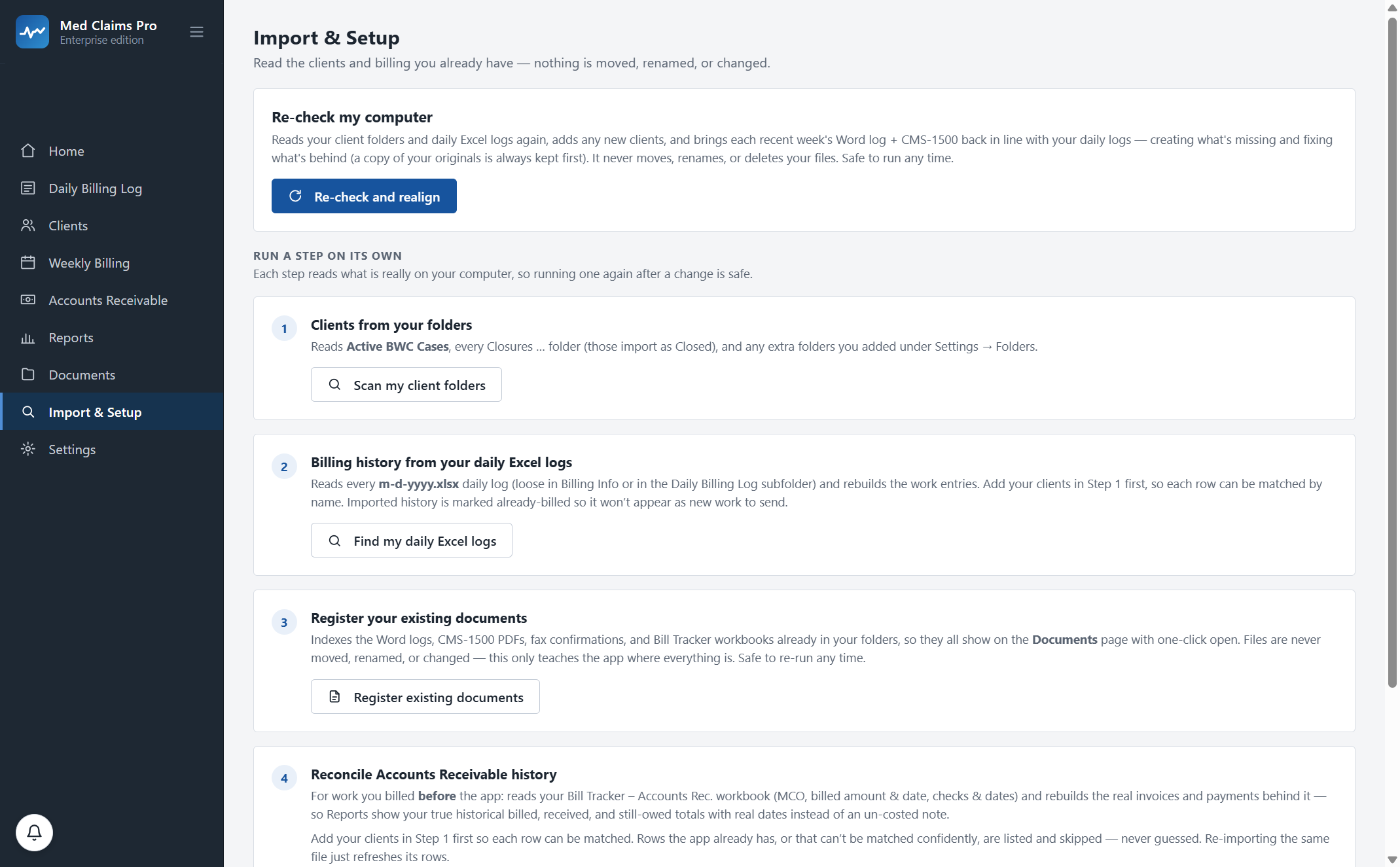
- Import one real week. This is the moment. Point the importer at a folder you already use. It reads your client folders, your daily Excel logs, your existing Word logs and CMS-1500s, and your Bill Tracker — and it never moves, renames or deletes anything. Your own Monday comes back as a grid, and from there the documents build themselves.
- Run a week end to end. Generate the tracking logs and the claim forms, mark the week billed, record a check that covers several claimants, and watch the short-pay get flagged with the exact gap.
What happens when the trial ends.
Nothing is deleted. Ever. This is the answer to the question you are actually asking, so it gets its own section rather than a line in a footer.
Trial expiry, precisely
- Your data
- Stays exactly where it is — a database on your computer, and your generated Word docs, CMS-1500s and Excel files in your own folders, under the names you gave them.
- The software
- Goes read-only. You can open it, read everything, and export everything, indefinitely.
- What you cannot do
- Add new work or generate new documents until you subscribe. That is the whole restriction.
- If you subscribe later
- Everything you entered during the trial is still there. You do not start over.
- If you never subscribe
- You still own and can export every record. We do not hold data hostage and there is no export fee.
- What we can see
- Your account and license. No claimant names, no claim numbers, no notes, no documents — none of it ever reaches our servers. How that works →
The full Professional plan, not a cut-down version.
The daily grid and your Excel log
Activities in 0.1-unit increments, rates and charges calculated as you type, and your daily Excel file written live into your own folder — still editable by hand.
Weekly tracking logs and claim forms
The Word narrative log per client and the CMS-1500, state form or invoice, with automatic overflow to B and C forms past the form’s six service lines.
Accounts receivable
Mark Billed, one payer check allocated across many claimants in one screen, aging by payer, and the tax-set-aside view.
Short-pay detection and rebilling
Every paid line compared to what was billed, the gap flagged in dollars and cents, and the rebill packet assembled with the original form attached.
Sending with proof
One-click fax through your own RingCentral account — you connect yours; we do not resell fax — with the confirmation filed into the client’s folder as timely-filing evidence.
Reports
Worked, billed, paid and owed, by client, payer and code, with an aging list that names who is sitting on your money.
Two things are worth saying plainly. Direct e-billing to mandate states is on the roadmap, not in the trial. And onboarding — configuring your exact Word and Excel templates, folder naming and payer list — happens when you subscribe; during the trial you get the standard Ohio templates, which is enough to judge the software but is not yet your letterhead.
The trial is the wrong start for some people.
If you would rather be shown than explore, book the demo. Fifteen minutes with your codes on screen tells you more than an afternoon of clicking, and you keep the trial afterwards with your state already loaded.
If you bill chiropractic, physical therapy, behavioral health or a physician practice, this is not built for you and the trial will waste your fortnight. Other vendors serve that world well.
If you are not on Windows, the software is a Windows 10/11 desktop application — that is what keeps the database on your own machine. Call us and we will tell you honestly whether that is workable for you.
(302) 202-3172 · admin@onservice.us · Sixty-day money-back guarantee once you subscribe.
Questions, answered.
Do I need a credit card?
No. Nothing is charged, there is no card on file, and there is nothing to cancel. The trial simply stops adding new work on day fifteen.
What happens to my data when the trial ends?
It stays on your computer and the software goes read-only — you can read and export everything, indefinitely. Nothing is deleted, and there is no export fee. If you subscribe later, everything you entered during the trial is still there.
Is my client data uploaded anywhere?
No. The database and every document live on your own computer. Our server holds your account and license and nothing else — no claimant names, no claim numbers, no notes, no documents.
Can I import my real files, or is the trial sandboxed?
You can import for real, and you should — that is the point of the fourteen days. The importer only reads: it never moves, renames or deletes a file, it keeps a copy of your originals first, and every step is safe to run again.
Which plan do I get during the trial?
Professional — the $299 plan, with accounts receivable, short-pay detection, faxing with filed confirmations and reports all switched on. If Forms at $49 turns out to be the right fit, you can start there when you subscribe.
What do I need to run it?
A Windows 10 or 11 computer. It is a desktop application on purpose: that is what keeps your claim data on your machine rather than on someone else’s server.
My templates and folder names are specific. Will the trial match them?
Not yet — the trial uses the standard Ohio templates, because Ohio is the one jurisdiction pack that ships configured. Matching your exact Word and Excel templates, folder naming and payer list is onboarding, which happens in your first week as a subscriber and is included in every plan.
What if I subscribe and it does not work out?
Sixty-day money-back guarantee. If it has not earned its place in your week, we refund it and export your data. You judge that, and you do not have to prove a number.