The fax went through.
The confirmation is the point.
Sending a CMS-1500 to an MCO takes a minute. Proving you sent it — eleven months later, to an auditor, or to a payer that says it never arrived — is the part that actually matters. One click sends the packet through your own fax account, and a dated submission record carrying the fax message id files itself into that claimant’s folder, where you will be able to find it.
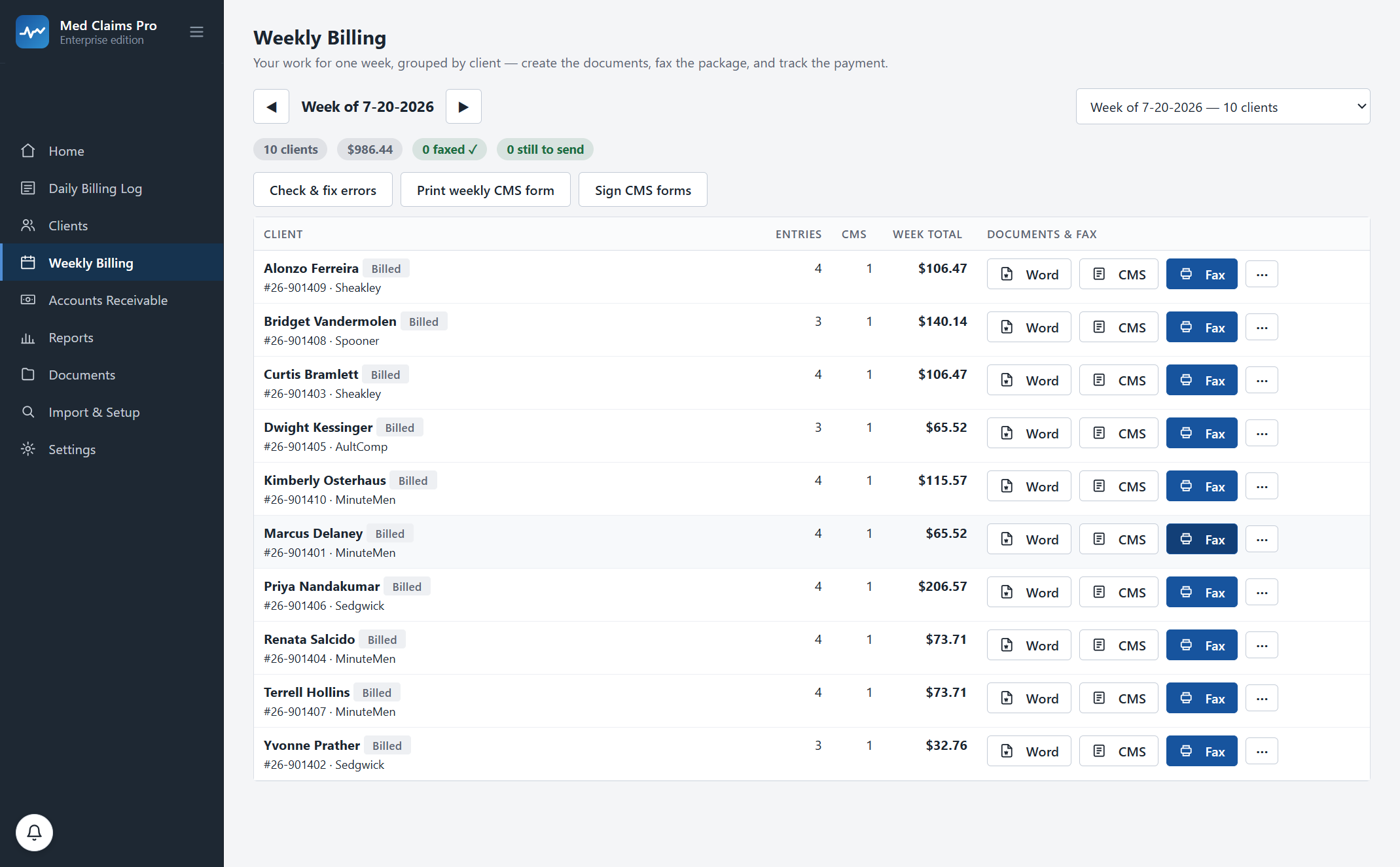
The packet, the cover, and the page that goes in a drawer.
You print the CMS-1500. You print the tracking log to staple behind it. You hand-write a cover sheet with the MCO’s fax number off a sticky note, feed the stack in, wait, and take the confirmation page off the tray. Then you either scan it into the right folder or you put it in the drawer with the others, and you know which of those actually happens at 4:40 on a Friday.
The bill is legally filed either way. The problem is eleven months from now, when a payer says it never received the claim and the burden of showing otherwise is entirely yours. In Ohio the filing window is a year from the date of service — plenty of time for a confirmation page to become a piece of paper nobody can find.
Here it is one click and nothing to transcribe. The packet is assembled from the week you already entered, the cover text is written for you — the payer, the claimant, the claim number, the billing week, your call-back numbers — and RingCentral renders the cover page itself from your own account. The fax goes out on your number, and a dated submission record carrying the fax message id is written into that claimant’s Fax Confirmations folder. You drop RingCentral’s own confirmation page in beside it, which is the piece of paper a payer dispute actually turns on. The bill flips to billed and becomes a receivable in the same motion.
Check, cover, send, file.
1 · It checks the week first
Before anything is sent, Check & fix errors walks the packet: every claimant with billable activity has a form, every form has a payer and a claim number, units and rates reconcile to the daily log, and a week that ran past six service lines has its B form. Whatever is wrong is listed in plain sentences, with the row to fix it on.
2 · The cover text writes itself
Attn line, the claimant and claim number, the billing week, and your own call-back name, phone and fax — addressed to the payer’s fax number from your payer list. No sticky note, no transcribing a number that changed in March. RingCentral renders the cover page itself from your account, which is why we do not build a second one and why an API send and a hand-sent fax look the same to the payer.
3 · It goes through your account
One click through your own RingCentral fax account — your number on the header, your records, your bill. We are not a fax service and we do not sit in the middle of your transmissions. If the send fails, it says so; nothing is ever marked sent because a button was pressed.
4 · The record files itself
A dated submission record lands in that claimant’s Fax Confirmations folder next to the form it belongs to: claim number, payer, destination number, billing week, status and the RingCentral message id. That is our record of the send, not the carrier’s — drop RingCentral’s confirmation page in the same folder and you have both. The bill becomes a receivable with a billed date on it, so the filing clock and the payment clock start from the same event.
What ships today, and what does not.
This is the section every honest software page owes you, and the one most of them skip. Three of these four you can use this afternoon. The fourth you cannot, and we will not pretend otherwise to close a sale.
| Channel | Status | What actually happens |
|---|---|---|
| Fax | Available today | Packet plus the cover text, sent through your own RingCentral account in one click, with a dated submission record written into the claimant’s folder. This is how Ohio MCO billing actually runs. |
| Payer portal — you upload | Available today | The form and its attachments are generated, named and filed ready to upload, and you mark the week billed so it starts aging from that date. You do the upload; we do not hold your portal credentials, and we would not want to. The software records that the bill went out, not which channel you used. |
| Paper / mail | Available today | A complete, print-ready CMS-1500 on plain paper — the whole form, not data positioned for preprinted red drop-out stock, which is not supported. Mark the week billed and it ages from that date. Still the required channel for some payers. |
| Direct e-billing | Roadmap | Electronic submission through a workers’-comp clearinghouse for the mandate states. Not built. Not connected to any clearinghouse today. Ask to be told the day it ships — that is the only promise we will make about it. |
“My state mandates e-billing. Doesn’t that make you useless to me?”
For medical bills in the mandate states, that is a fair question and the answer depends on where you work. Providers are required to bill electronically in Texas, Minnesota, North Carolina, Virginia, Tennessee, New York (since August 2025) and Colorado (since January 2026). Everywhere else, fax, portal and paper remain first-class — which is exactly why proof of sending is a headline feature and not a legacy one.
What Med Claims Pro does in a mandate state today is everything up to the wire: the activity grid, the daily log, the weekly tracking logs, the correctly coded form with its overflow, the receivable, the check allocation and the short-pay flag. What it does not do is push the file down the wire for you. If that is a deal-breaker for your practice, say so on the call and we will tell you honestly to wait for us.
Mandate dates current as of July 2026 — verify with your state’s workers’-compensation agency before relying on them. Rules change, and the penalty for being wrong is yours, not ours.
The filing clock, where the proof gets used
- Ohio
- One year from the date of service. Bill the MCO; the fax confirmation is your evidence.
- Texas
- 95 days. Short enough that a bill lost on a Friday is a bill you never get paid for.
- Colorado
- 120 days, alongside the January 2026 e-billing rule.
Filing windows current as of July 2026 — verify with Ohio BWC, Texas DWC and the Colorado Division of Workers’ Compensation respectively. Full list: timely filing by state.
“I don’t own a fax machine.” “What if it fails?”
Nobody does. That is the point.
You already pay for RingCentral, or you can — check their current pricing, we are not going to quote it for them — and it already sends faxes from your computer. We use the account you have, with your fax number on the header. No new subscription, no per-page fee to us, no machine in the corner with a paper tray.
A failed fax stays failed
Busy line, wrong number, a payer’s machine that hung up on page four — the send comes back failed and the bill stays unsent, visibly, in the week’s list. It is not marked billed and it does not become a receivable, because a bill nobody received is not a bill. Resend when you are ready; the confirmation that eventually arrives is the one that gets filed.
Fifteen minutes, your payers and their fax numbers on screen, and a week that sends itself. Or call and ask: (302) 202-3172.
Questions, answered.
Do I need a fax machine or a fax line?
No. It sends through your own RingCentral account — the one you already pay for — from your computer, with your fax number on the header. We are not a fax service and never sit between you and the payer.
What exactly gets filed, and is it the payer’s confirmation?
Two different things, and the distinction matters. The software writes its own dated submission record — a plain text file named like "Faxed 7-20-2026 (2026-07-24).txt", holding the claim number, the client, the payer, the destination fax number, the billing week, the status and the RingCentral message id — into that claimant’s Fax Confirmations subfolder, next to the CMS-1500 it belongs to. That is our record of the send. RingCentral’s own confirmation page is the carrier-side evidence, and you save it into the same folder; the app even says so on a hand-recorded send. Both are ordinary files in your own Documents tree: openable in eleven months without the software, and openable if we disappeared.
Does it fax the tracking log with the claim form?
Yes. The packet is the weekly tracking log and then the claim form or forms — exactly the stack you would staple together by hand. RingCentral adds the cover page and reports the page count on its own confirmation; the software does not count pages for you.
Do you support e-billing or a clearinghouse?
Not today, and we will not tell you otherwise. Fax with filed proof, a portal upload you do yourself, and paper are what ships now. Direct electronic submission for the mandate states — Texas, Minnesota, North Carolina, Virginia, Tennessee, New York and Colorado — is on the roadmap and is not connected to any clearinghouse yet. Ask to be on the list and we will tell you the day it ships.
What if my payer wants email or a portal upload instead of a fax?
The form and attachments are generated, named and filed ready to send, and you mark the week billed so it starts aging from that date. Be aware of the limit: the software records that a bill went out and when, not which channel it went by, and each payer in your list holds its address, phone, fax and CMS-1500 template rather than a preferred channel. If you never fax, you file your own upload receipt into the same folder.
Is the fax feature in every plan?
One-click fax is in Professional ($299/mo, $239 billed annually), together with receivables and short-pay detection. Forms at $49/mo generates and prints the claim forms for you to send yourself. Note that faxing goes out through your own RingCentral account — that is the only fax service connected today, and there is no e-billing. Full pricing →
See your own week run itself.
We load your state’s codes before the call, so you are looking at a caseload like yours inside the first two minutes — not a slide deck.