Worked, billed, paid, owed.
Four numbers that never argue.
Ask your spreadsheet what you earned last month and you get three different answers depending on which column you trusted. These four are counted on four different clocks, kept strictly apart so nothing is ever added twice — and each one opens into the client, the payer, the code and the bill it came from.
“How much did I make in July?”
The daily log says one number. The Bill Tracker says another. The bank says a third, and it is for work you did in May. None of them is wrong — they are counting different things, on different days, and adding any two of them together double-counts your year.
Four numbers, four clocks
- Work performed
- Counted by date of service. What you actually did, whether or not it has been billed.
- Submitted
- Counted by date sent. What went out the door in this period, including work from last week.
- Payments received
- Counted by check date. Money that actually arrived, in the period it arrived.
- Still owed
- Counted as of today. Not a period at all — a standing balance.
In the week below, work performed and submitted both read $2,987.33 — a tidy week where everything worked was also sent. They are still two numbers on two clocks: the moment a bill carries into next week, or a Friday’s work waits for Monday’s fax, they diverge — and the report keeps them apart so you never add one to the other.
Payments received in that same week read $1,863.43 — every check dated inside it — while still owed reads $1,123.90, counted as of today across every open bill you have ever sent. Different clocks, never added together. The report will not quietly move a payment into the period that makes a total look better.
That discipline is the entire point. Every screen in the app either shows you one of these four numbers or tells you which one it is showing.
Five payers, twenty-eight bills, one screen.
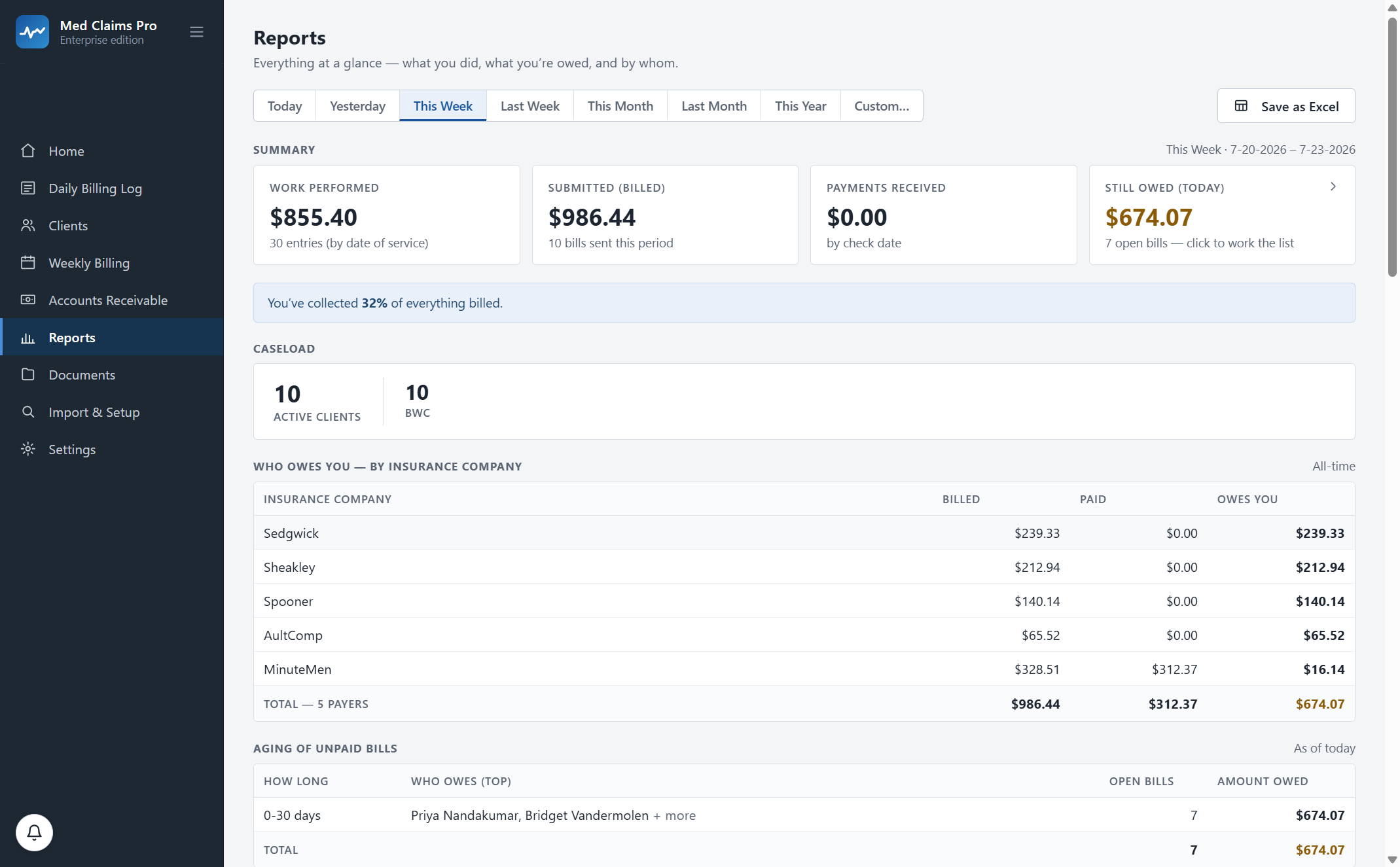
Not “you are owed $1,123.90”. Who owes it, and for how long.
An aging bucket with no names in it is a number you cannot act on. This one lists the claimants and the payers sitting in each band, with the count of open bills, so Tuesday’s follow-up call has a list instead of a search.
Buckets that mean something
0–30, 31–60, 61–90 and over 90 days, aged from the day the bill was sent — not from the date of service, which is the mistake that makes everything look overdue.
Names in the bucket
Thirty-one open bills, $1,123.90, Poe, James D. and Roe, Robert L. at the top. Click through to the bills themselves and the forms behind them.
The payer view
Billed, paid and owed for every MCO, carrier or TPA you work with, all-time or for any period. The one that is always ninety days late becomes visible instead of anecdotal.
The client view
What one injured worker’s case has produced — worked, billed, paid, still open — for the week you are asked about on a call.
The code view
Which codes carry your month. Assessment work at $91.00 against plan implementation at $81.90, by count and by dollars, so you can see what your caseload is actually made of.
Ohio rates current as of July 2026 — verify with Ohio BWC.
Any period, one click
Today, yesterday, this week, last week, this month, last month, this year, or a custom range — and Save as Excel on every one of them.
The set-aside view: what is yours, and what was never yours.
There is a column in your workbook — ours reads about 37% — where you take a share of every payment off the top and try not to look at it again until January. It is one of the first things a spreadsheet grows a column for.
So it is a view: money received in the period, the percentage you set applied to it, and the remainder. Your percentage, your quarters, your accountant’s advice — we do not set the rate and we do not give tax advice. We just stop you doing the multiplication on a Sunday and typing the answer into a third place.
It exports to Excel with everything else, which is the format your accountant asked for anyway.
Illustration using the figures on the screen above. The set-aside percentage is yours to set with your own accountant; Med Claims Pro is not a tax adviser and does not calculate tax liability.
“I do not need a dashboard. I need the number my accountant asked for.”
Save as Excel, on every report
Not a PDF of a chart. A spreadsheet, with the rows, in the format your bookkeeper already works in — and the same figures you are looking at on screen.
Every total opens
A total you cannot trace is a total you cannot defend. Click $1,123.90 and you get the thirty-one open bills; click a bill and you get the claim form and the entries behind it.
Reconciled to the documents
The figures are checked against the claim forms and tracking logs actually on disk, not just against what the database thinks was filed — so a report and an audit tell the same story.
And it reports on your practice, not a template of one. During onboarding we configure Med Claims Pro to your exact formats, your folders, your payers and your state’s codes — your case types, your set-aside percentage, the payers you actually bill — so every figure here is counted the way your practice runs. Included in every plan.
See it with a caseload like yours: fifteen minutes, your state’s codes on screen. Or call and ask; a person answers: (302) 202-3172.
Questions, answered.
Why do "work performed" and "submitted" disagree?
Because they are counted on different clocks. Work performed is counted by date of service; submitted is counted by the date the bill went out, and a bill sent this week usually covers work done last week. Keeping them apart is what stops a year of billing being counted twice.
Why does a period show $0.00 received when I know a check came in?
Payments are counted by check date. If the check is dated outside the period you are looking at, it belongs to the period it is dated in — the report will not move it to make a total look better. The payer table and the still-owed figure show it immediately.
Can I get this by payer and by code, not just by client?
Yes — by client, by payer, by case type and by service code, for any period, all-time included. Every breakdown exports to Excel.
How is aging calculated?
From the day the bill was sent, in 0–30, 31–60, 61–90 and 90-plus day buckets, with the claimants and payers named in each one and a count of open bills. Aging from the date of service, which some spreadsheets do, makes perfectly current bills look overdue.
Does it show me short-pays as well as unpaid bills?
Yes. A partially paid bill keeps its remaining balance and shows up as a real number in the payer table and the aging list — the $16.14 in the screenshot above is exactly that. Short-pay recovery is where you act on it.
Is the tax set-aside tax advice?
No. It applies a percentage you choose to the payments you actually received and shows the remainder, so you are not doing that arithmetic by hand. Choosing the percentage, and everything downstream of it, is between you and your accountant.
Can my accountant get at this without using the software?
Yes. Every report saves to Excel, and the underlying documents are ordinary files in your own folders. If you ever cancel, the software goes read-only and you keep viewing and exporting all of it, indefinitely.
See your own week run itself.
We load your state’s codes before the call, so you are looking at a caseload like yours inside the first two minutes — not a slide deck.