One form holds six lines.
Your week held nine.
So line seven starts a B form on its own, line thirteen starts a C form, and each one comes out a complete claim — full claimant and provider blocks, its own total charge, its own receivable row. Filled from the entries you already typed, with the right units, the right level suffix and the right payer header.
You get to line six and the week is not finished.
So you start a second form. Retype the name, the claim number, the date of birth, the address, the tax ID, the provider block. Split the totals by hand and hope you carried them correctly. Then file both under one entry in the Bill Tracker — and three weeks later the check covers form A only, and “partially paid” becomes a thread you have to hold in your head until October.
The six-line limit is on the form, not on your week. It should cost you nothing.
Each overflow form is a whole CMS-1500, not a continuation sheet: complete claimant, insured, diagnosis and provider blocks, its own six service lines, its own Box 28 total.
And each one gets its own receivable row, because bill review processes forms separately and that is how the checks come back. “The week is partly paid” is almost always “form B has not paid yet” — and you should be able to see which.
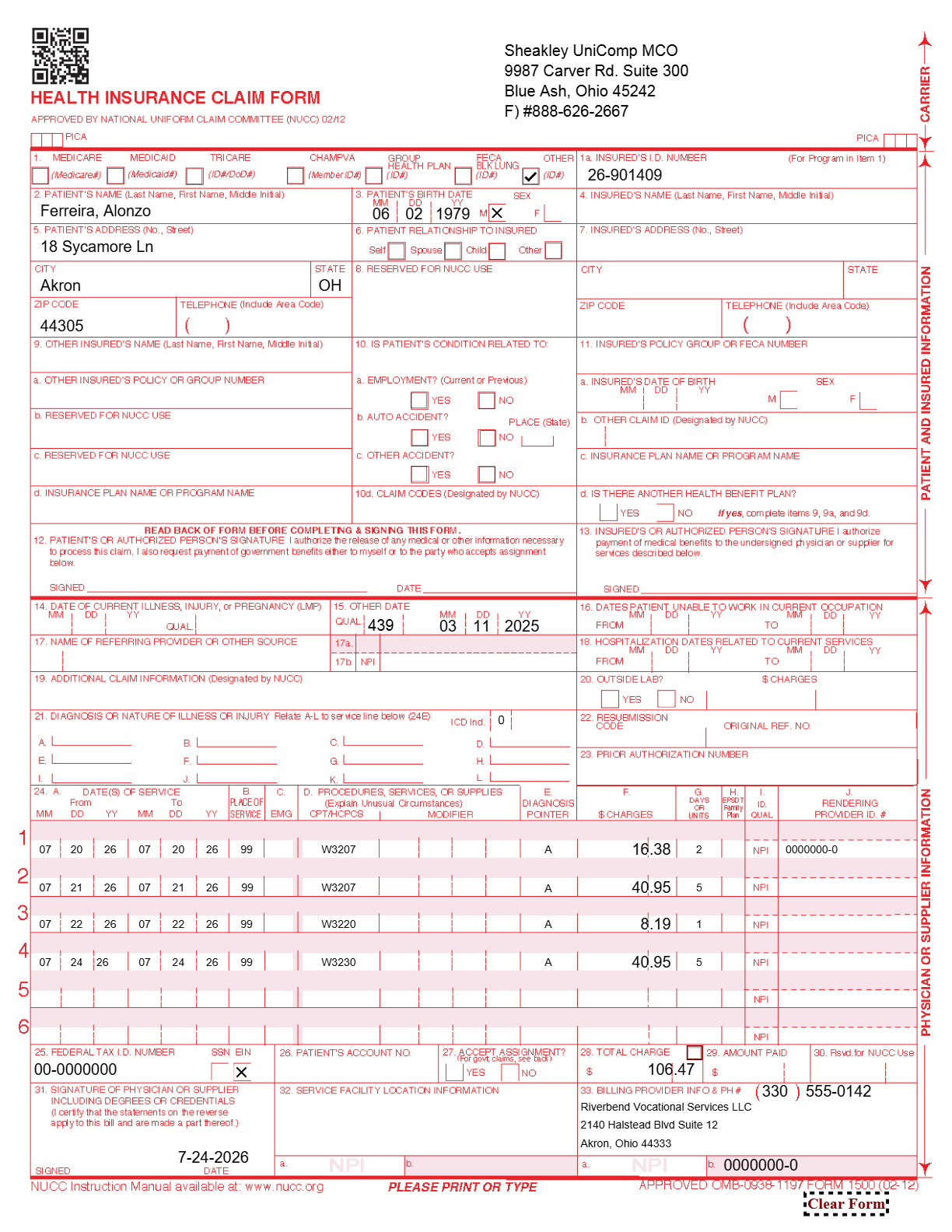
A finished form, from four rows of a grid.
Nothing on the form is typed on the form.
Every field is already somewhere — in the client record you set up once, or in the entries you made during the week. The form is a view of them.
| On the form | What goes in it | Where it comes from |
|---|---|---|
| Carrier block (top right) | The payer’s name, address and fax | The client’s MCO, carrier or TPA |
| Box 1a | The claim number, e.g. 26-901409 | The client record — typed once, when you opened the case |
| Boxes 2, 3, 5 | Name, date of birth, address including the apartment or suite line | The client record |
| Box 15 | Date of injury, with qualifier 439 — Box 14 stays blank | The client record |
| Box 21 | Diagnosis codes, checked against the ICD-10 shape and flagged if they look wrong | The client record |
| Box 24A | Dates of service, one line per activity | The daily grid |
| Box 24D | The service code with its level suffix — W3207W2 for a Level 2 case | The code plus the case’s level |
| Box 24F | Charges, per line | Units × the rate in force on the date of service |
| Box 24G | Units, converted the way the form wants them | 0.1 becomes “1”; 23 miles stays “23” |
| Box 28 | Total charge for this form — not for the week | The lines on this form only |
| Box 31 | Signature and date | Dated the week-ending Friday, the way the week was billed |
| Box 33 | Billing provider block, NPI and tax ID | Your practice settings |
Box behavior shown for Ohio BWC vocational rehabilitation billing, current as of July 2026 — verify with the Ohio Bureau of Workers’ Compensation or your MCO. Box qualifiers for other states are configured during onboarding. The CMS-1500 is the one claim form the software generates; there is no state-specific form generator today.
Units, levels, and the payer header.
Units, converted once and correctly
Time-based codes go onto the form multiplied by ten: 0.1 units becomes “1”, 0.5 becomes “5”, 1.2 becomes “12”. Count-based codes — mileage, outcome payments — go on as they stand. You never do that arithmetic, and it is never done twice differently on two forms of the same week.
The level suffix, from the case
A leveled code bills as its base at Level 1 and with the suffix above it — W3207 at $81.90, W3207W2 at $84.40. The case carries the level, so the form carries the suffix, so the payer’s bill review does not kick it back.
Ohio rates current as of July 2026 — verify with Ohio BWC.
The right payer, every time
The client’s MCO decides the carrier block and the template. Ohio’s managed-care organizations are packaged; a payer outside the packaged set still produces a correct form — the app fills a blank CMS-1500 and stamps that payer’s own carrier block onto it, so a new MCO or a self-insured employer never blocks a bill.
Checked, filed, and turned into money you can track.
Verified before it leaves
Check & fix runs the week before anything is sent: missing claim numbers, an address block that would print blank, entries added after the form was generated, totals that no longer agree. It itemizes what it corrected instead of just clearing the warning.
Filed your way
The PDF lands in that client’s CMS 1500 folder under your naming convention — the Monday date, with overflow forms suffixed, e.g. “7-20-2026 B.pdf”. Printable as a batch when you would rather sign a stack.
Sent with proof
The packet — cover sheet, claim form, tracking log — faxes from your own account, and a dated submission record with the fax message id files itself into the client folder, where RingCentral’s own confirmation page goes beside it. How sending works →
One receivable per form
Each form opens its own tracked bill, so a check that pays A and not B shows you exactly that. Accounts receivable →
The log goes with it
The weekly tracking log is generated from the same entries, so the narrative behind the bill always covers exactly the lines on the bill. Tracking logs →
Ordinary PDFs
Real PDF claim forms in your own folders, openable in any reader, printable on any printer, yours whether or not you are still a subscriber.
“My payer wants its own form, and my state is not Ohio.”
Then that is what onboarding configures. The CMS-1500 is the common case in workers’-comp vocational rehab, but the machinery underneath is: take the week, apply the payer’s rules, produce that payer’s document, split it when it overflows, and open a receivable per document.
Nurse case managers usually bill the same week as an hourly invoice rather than a claim form — which the software does not generate as a document; what it gives you is every line dated, timed and priced, plus a CMS-1500 where a carrier does take one — and that works in all fifty states today. The invoice version →
On e-billing: today it is fax with a filed confirmation, a portal upload you do yourself, and paper. Direct electronic submission for the mandate states is on the roadmap. We will tell you when it ships and not before.
Configured during onboarding, included in every plan
- Your payers
- Each MCO, carrier, TPA or self-insured employer with its own template and carrier block.
- Your state
- The form, the codes, the unit convention and the filing clock for where you work.
- Your provider block
- NPI, tax ID, address, signature line — entered once.
- Your file names
- Including how you already suffix overflow forms.
Fifteen minutes, your state’s codes on screen — bring one real week and watch the forms come out. Or call and ask; a person answers: (302) 202-3172.
Questions, answered.
What happens when a week has more than six service lines?
Line seven starts a B form automatically and line thirteen a C form. Each is a complete CMS-1500 with the full claimant, insured and provider blocks, its own six service lines and its own Box 28 total — and each opens its own receivable row. See how your week splits.
Do payers really process overflow forms separately?
Frequently, yes — bill review works form by form. That is why one receivable per form matters: when the check covers form A only, you see that form B is outstanding instead of guessing at a week that is “partly paid”.
How do the units get onto the form?
Time-based codes are multiplied by ten, so 0.1 units prints as “1” and 0.5 prints as “5”. Count-based codes such as mileage print as they stand. The conversion happens on the form; you keep entering work the way your fee schedule counts it.
What date does the form get signed with?
The week-ending Friday, which is how the billing week was filed. Signatures can be applied to a batch of forms at once rather than one at a time.
Where does the injury date go — Box 14 or Box 15?
Box 15, with qualifier 439, and Box 14 is left blank. That is the convention the MCOs expect for these bills, and it is one of the small things that gets a form kicked back when it is done by hand.
My MCO is not one of the ones you package. Am I stuck?
No. A payer outside the packaged set still gets a correct claim form: the app fills a blank CMS-1500 and stamps that payer’s own carrier block onto it. A new MCO, a TPA or a self-insured employer never blocks a bill.
Can I print and sign a stack instead of doing them one at a time?
Yes. Print the week’s forms as a batch, and apply the signature to the batch. The PDFs are still filed individually into each client’s folder under your naming convention.
See your own week run itself.
We load your state’s codes before the call, so you are looking at a caseload like yours inside the first two minutes — not a slide deck.