Billing software for
workers’ comp nurse case managers.
Field or telephonic. Log the visit, the call, the wait time and the miles once — the activity grid, the weekly narrative log and the receivables follow, per case file, per payer.
You drove ninety minutes, waited forty, and the visit was twenty-five.
All three are billable. Two of them get forgotten.
Field case management is measured in fragments — a six-minute adjuster call, a mileage leg, wait time in an orthopedist’s lobby, a report written at 9 p.m. Every fragment belongs to a case file, a claim number and a referral source. Here is the day, and what the software has already done with it.
- 7:20 a.m. Telephonic contact with the injured worker before her shift. Eight minutes. One row: case file, claim number, activity type, minutes, note. The referral source, the payer and the billing rate attach themselves.
- 9:05 Depart for the IME. Fifty-two miles. Mileage is its own line at your contracted rate, and it prints as written — 52 stays 52, never multiplied by ten because a form expected units.
- 10:15 Waiting room. Forty minutes before you are called back. Wait time is a billable line with its own description, so it survives the invoice review instead of quietly disappearing.
- 1:40 p.m. Call with the adjuster on return-to-work restrictions. Eleven minutes. Same grid, different case file. The day totals as you go, so you know what Thursday was worth before Thursday ends.
- 9:00 p.m. The second shift: the progress reports, the invoices, the spreadsheet that tracks who paid. The spreadsheet is gone — every bill you mark sent is already a tracked receivable. The report is written from entries that are already dated, timed and described, rather than reconstructed from a calendar at 9 p.m.
The log is what your invoice is made of.
You are not entering billing data. You are entering case notes, and every billable line falls out of them: one entry carries the time, the mileage, the note and the case file, priced as you type. So the figures you put on an invoice and the narrative behind it come off the same rows and cannot contradict each other.
What it does not do: it does not write the invoice document itself. There is no invoice generator in the software today — what it generates is the weekly narrative log in your Word template, the daily Excel log, and a CMS-1500 where a carrier takes one. Ask about it on the call; do not find out afterwards.
| Date | Activity | Hrs / Qty | Rate | Amount |
|---|---|---|---|---|
| 7/13 | Telephonic contact — injured worker | 0.3 | $105.00 | $31.50 |
| 7/14 | On-site visit — attending physician appointment | 1.2 | $105.00 | $126.00 |
| 7/14 | Wait time — physician office | 0.7 | $105.00 | $73.50 |
| 7/14 | Travel — round trip | 52 mi | $0.70 | $36.40 |
| 7/15 | Adjuster conference — RTW restrictions | 0.2 | $105.00 | $21.00 |
| 7/17 | Progress report — prepared and transmitted | 0.8 | $105.00 | $84.00 |
| Week total, billable | $372.40 |
Illustration with invented names and rates. These are the rows the software holds and prices — the ones you copy onto whatever invoice your referral source wants. Your activity types, your rates and your line descriptions are configured during onboarding.
Every task on your desk, and the thing that replaces it.
The case-management side needs no state pack.
This matters, so here it is without hedging. Vocational rehab billing is state-specific — Ohio’s W-codes, Washington’s MARFS units, Minnesota’s R-forms — and Ohio is the only pack that ships configured today. Nurse case management does not work that way: you bill carriers, TPAs and self-insured employers for time and mileage against a claim number, and that is the same transaction in every state. The activity grid, the weekly narrative log, the receivables and the aging work here now, with no jurisdiction pack to wait for. What is NOT here is an invoice document generator, in any state.
North Carolina
The Industrial Commission keeps a registry of workers’-comp rehabilitation professionals that covers medical case managers as well as vocational ones, under 11 NCAC 23C. If you are on that registry, your reporting obligations look a lot like a voc provider’s. North Carolina billing →
Maryland
The Workers’ Compensation Commission registers “rehabilitation practitioners,” and that registration explicitly includes nurse case managers — which is why Maryland NCMs get asked for credentials the way vocational providers do. Maryland billing →
Georgia
State Board Rule 200.2 requires registration for non-catastrophic medical case managers, alongside the registered rehabilitation suppliers under Rule 200.1. Georgia billing →
Current as of July 2026 — verify with the North Carolina Industrial Commission, the Maryland Workers’ Compensation Commission and the Georgia State Board of Workers’ Compensation before relying on any registration requirement.
“Every referral source wants a different invoice.”
They do. One TPA wants your hours to two decimals and mileage on its own line. One carrier wants its claim number in the header and a monthly summary behind every invoice. A self-insured employer wants its own cover page. Sedgwick does not read like Gallagher Bassett, and neither reads like CorVel, ESIS or Broadspire.
During onboarding we configure Med Claims Pro to your activity types, your rates, your folders and your payers, and the weekly narrative log to your own Word template. That is included in every plan, and it is the first week’s work, not a change order. The invoice each referral source wants is still yours to send — what changes is that every figure on it is already dated, timed and priced, and is a tracked receivable the moment it goes.
Bring one real month to the demo and watch your own week come out the other side — the grid, the priced lines and the narrative log, and an honest answer about what you would still be assembling by hand.
What “configured to you” means, concretely
- Your activity types
- Telephonic, on-site, wait time, report writing, mileage — each its own line with its own description, so nothing gets absorbed into the visit.
- Your rates
- One rate per activity type, effective-dated: change a rate and everything you already billed keeps the rate it was billed under.
- Your folders
- Logs, forms and confirmations land in the case folders you already keep, named your way.
- Your payers
- Sedgwick, Gallagher Bassett, CorVel, ESIS, Broadspire and self-insured employers — each with its address, phone and fax on the record, and its own CMS-1500 template where one is used.
- Your weekly log
- The narrative log in your own Word template, built from the same rows the bill is.
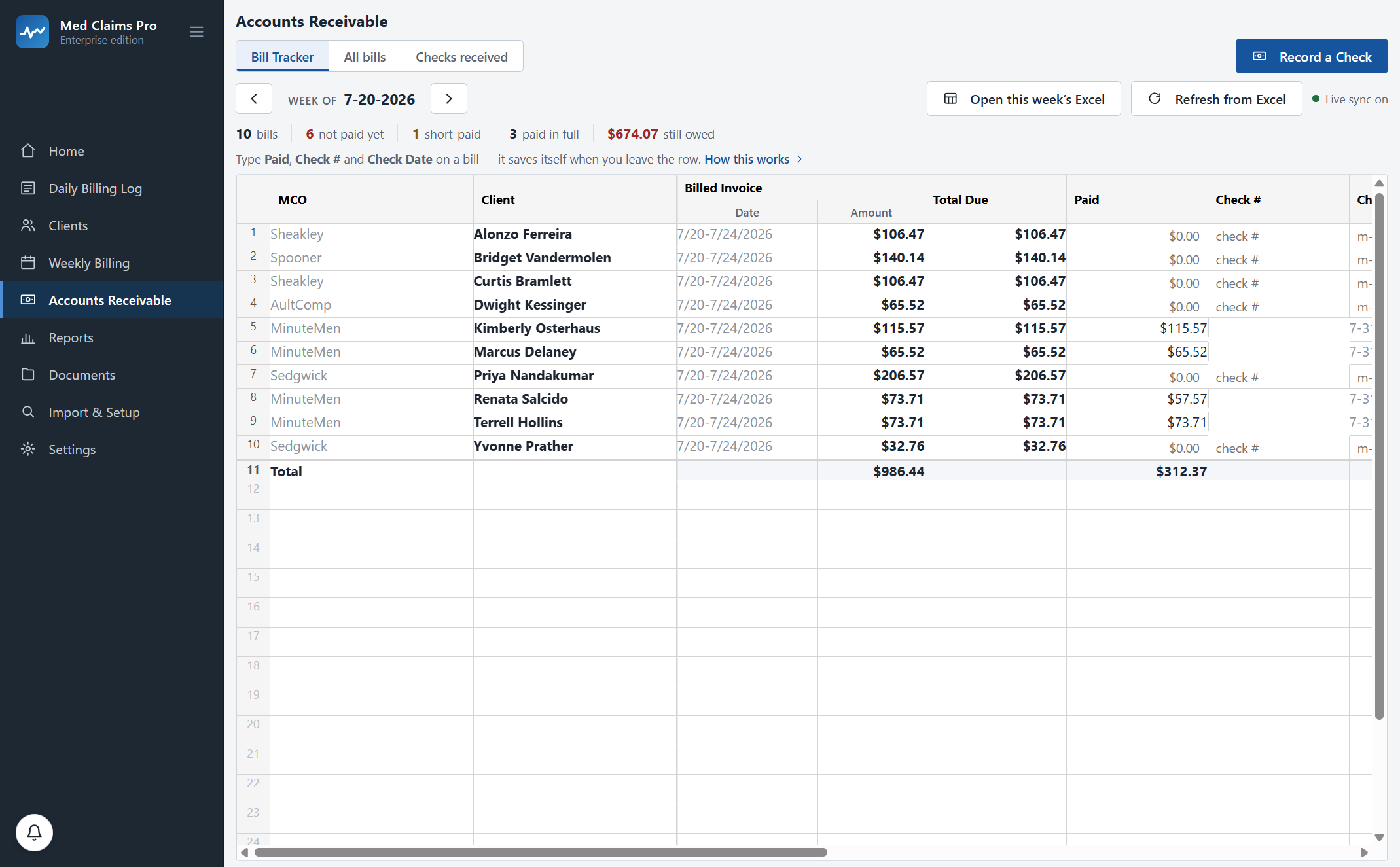
The remittance came. It covered eleven case files. Two of them short.
You would catch it eventually — around 11 p.m., cross-referencing the remittance against the spreadsheet, one invoice number at a time.
Med Claims Pro catches it the moment you record the check. Every paid line is compared to what you billed. The week of 7/13 on claim 26-901404 went out at $372.40 and came back at $298.90: the wait-time line — forty-two minutes in an orthopedist’s lobby, $73.50 — was struck. It is flagged as a $73.50 gap on that case file, with the original bill attached and the resubmission ready. Nothing slips into “I’ll chase it later,” which is where short-pays go to die.
And the aging list tells you which TPA is at sixty days before you have to guess.
What the receivables side does
- Mark billed
- Every bill becomes a tracked receivable the moment you mark it sent.
- One check, many files
- Allocate a single TPA payment across a dozen claims in one screen.
- Short-pay flag
- The exact gap, per line, with the original bill attached.
- Aging
- 0–30, 31–60, 61–90 and 90+ day buckets by payer, from the date you sent it.
- Tax set-aside
- The column you keep by hand, kept for you.
Claimant data never touches our servers.
It lives on your computer
Case files, notes, bills and reports sit in a local database on your own machine, backed up automatically on every launch. Our server holds your license and nothing else. You have had twenty-five years of privacy training; this architecture is built for that instinct, not against it.
In your folders, in your formats
Logs, forms and confirmations are written into the case folders you already use, named the way you already name them, and they open in Word and Excel with or without us.
Never held hostage
Cancel and the software goes read-only. You keep viewing and exporting everything indefinitely. No deletion, no export fee, no contract.
See it with a caseload like yours.
Fifteen minutes, your activity types and your own week on screen. Or call and ask — a person answers: (302) 202-3172.
Questions, answered.
Do I have to wait for your state to be built like the vocational side does?
No. Billing time and mileage against a claim number is the same transaction in every state, so the activity grid, the weekly narrative log, the receivables and the aging work everywhere today — your activity types, rates and line descriptions are configured during onboarding. Two honest limits: the software does not generate an invoice document (you send your own, from figures it has already dated, timed and priced), and Ohio is the only jurisdiction pack that ships configured. Where a carrier takes a CMS-1500, it fills one in full.
Does it produce the invoice my TPA wants?
No — not as a document, and it is better you hear that now than on day three. There is no invoice generator in the software. What it does is hold every billable line dated, described, timed and priced per case file, write the weekly narrative log in your own Word template, fill a CMS-1500 where a carrier takes one, and turn each bill into a tracked receivable with aging and short-pay flagging the moment you mark it sent. The invoice itself you still send. If invoice generation is the reason you would buy this, tell us on the call.
We are a four-nurse firm. Does it work for more than one person?
Each nurse runs their own copy on their own Windows PC with their own records — the database lives on the machine, so four of you means four subscriptions, not one shared book. Shared case files, roles and org-wide aging are being built and are not in the software today; a firm is priced on a call. See multi-counselor firms for where each piece honestly stands.
Can it handle carriers, TPAs and self-insured employers at the same time?
That is the normal case. Each payer carries its own invoice or form template, its own rates and its own delivery details, and the aging report separates them so you can see which TPA is slow without doing the arithmetic yourself.
Is mileage handled properly?
Yes, and it is worth asking. Mileage and other count-based lines print exactly as entered — 52 miles bills as 52. Time-based lines follow whatever unit convention the payer’s form requires. Getting that backwards is a common way to lose money quietly.
Is my case data on your servers?
No. Case files, notes, bills and reports live in a local database on your computer and in your own folders. Our server stores your account and your license — that is the whole list. How the architecture works.
What does it cost?
Forms $49/mo, or $468 for the year (20% off), covers clients, the daily billing log and the CMS-1500 filling and printing. Professional $299/mo, or $2,868 for the year, adds the weekly Word tracking logs, error checking, receivables, short-pay recovery and faxing. A firm plan for more than one specialist is priced on a call — and note each person runs their own copy with their own records. 14-day free trial, no card. Sixty-day money-back guarantee: if it has not earned its place in your week, we refund every cent and export your data in your formats. Full pricing.
See your own week run itself.
We load your state’s codes before the call, so you are looking at a caseload like yours inside the first two minutes — not a slide deck.