One entry.
Every document downstream.
Thirty activities a day in tenth-of-an-hour units — W3220 for the notes you reviewed, W3235 for the progress report, W3020 for the assessment interview. You type each one once, as it happens. The daily log, the weekly tracking logs, the claim forms and the receivables build themselves from it.
Six minutes of work. Four separate acts of typing.
7:13 a.m. — you reviewed the employment specialist’s notes. Six minutes, one code. Tonight that entry goes into the daily log. Sunday it goes into the weekly tracking log. Then onto the claim form, line by line, six lines to a page. Then into the spreadsheet that tracks whether anyone paid it. Four copies of the same six minutes.
W3220 0.1 $81.90 $8.19
Rec’d/rev’d ES notes [7:13am–7:19am] 6 min
Nobody ever built software for this job, so the job got done in Excel, Word and a PDF form-filler — and the retyping became the profession. That is the part we deleted.
How a billing week runs.
Five steps, Monday to the check. Everything after step one is something you review rather than something you type.
Type the work as it happens
Client, code, minutes, note. The rate, the claim number, the payer, the level suffix and the billing week fill themselves. Your daily Excel file saves itself as you go. The daily grid →
The documents generate
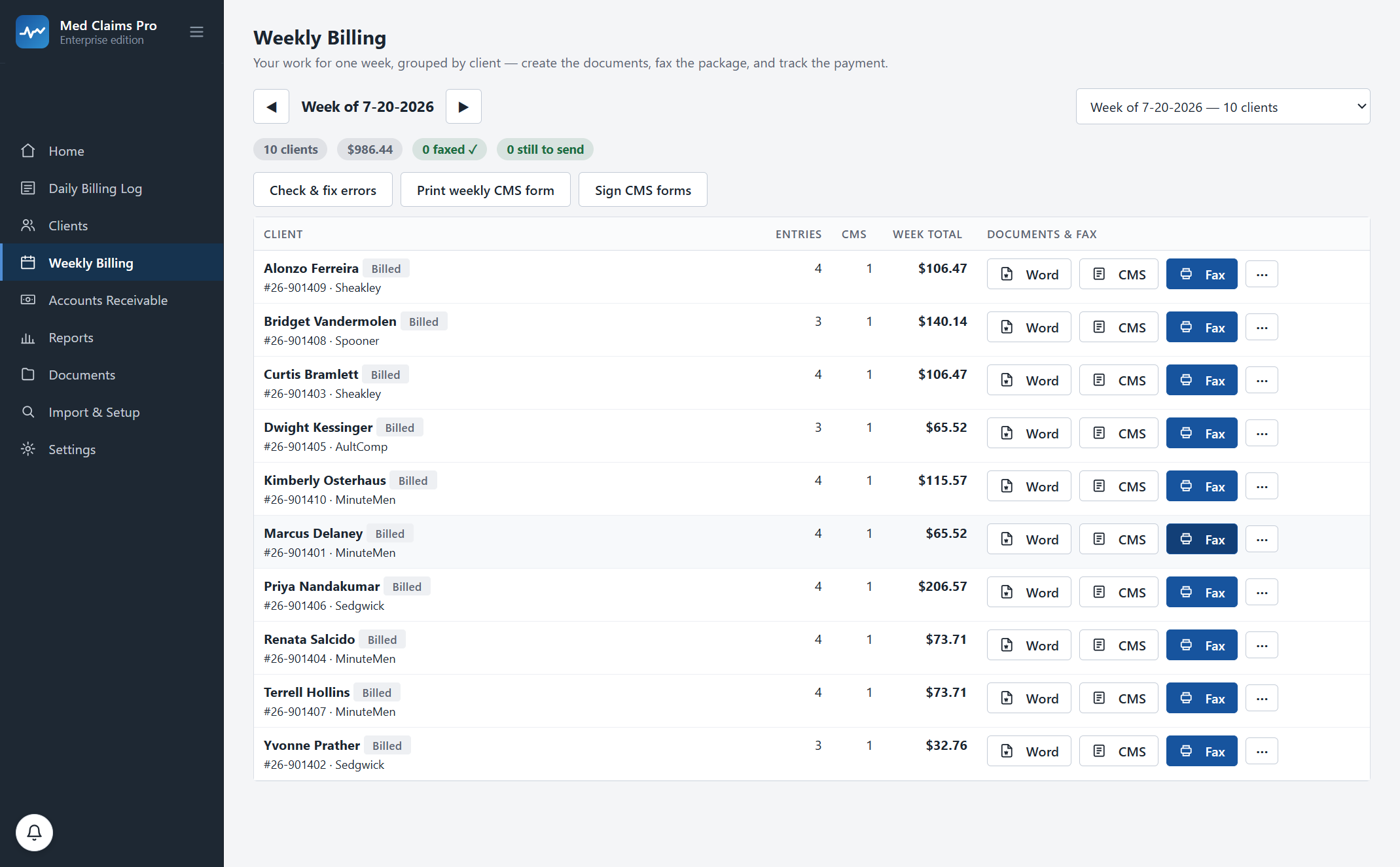
The weekly tracking log per client, in your Word template. The claim forms with the right payer header, the right units, automatic overflow onto B and C forms. Filed into your folders, named your way. Tracking logs → CMS-1500 →
Send it with proof
Check & fix errors runs the week first and itemizes anything it corrected. Then the packet goes out the way your payer takes it — a one-click fax from your own RingCentral account, a portal upload you do yourself, or paper — and a dated submission record with the fax message id files itself into the client’s folder, where RingCentral’s own confirmation page goes beside it. Together those are your timely-filing evidence. Direct e-billing, which TX, MN, NC, TN, VA, NY and CO now mandate, is on the roadmap. Sending with proof →
Record it once, allocate it across everyone
One MCO check covers a dozen claimants. Tick the bills it pays; overpayment is blocked and every dollar ties back to the form it paid. Anything short is flagged with the exact gap and the original form attached. Accounts receivable → Short-pay recovery →
See the whole business
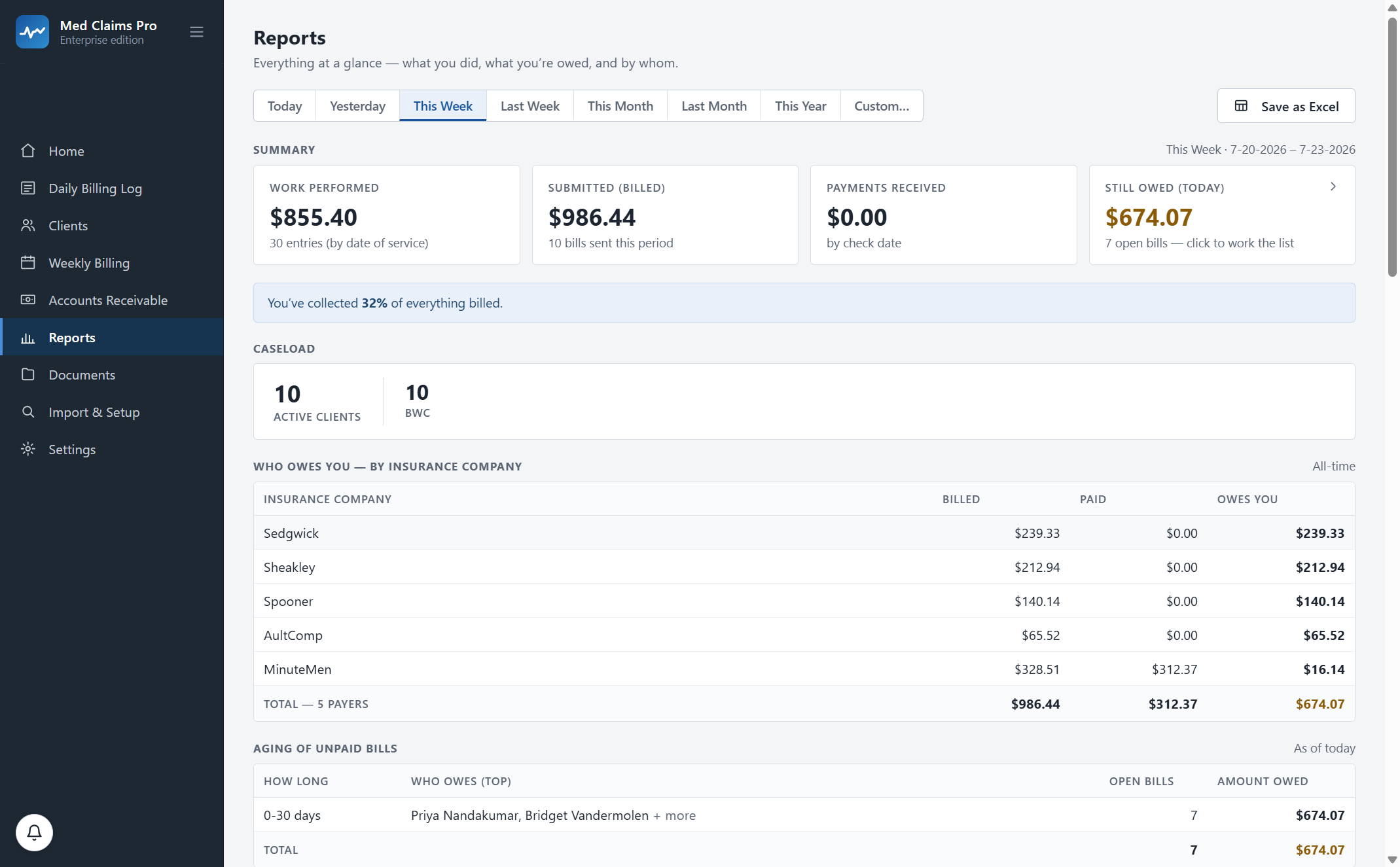
Worked, billed, paid and still owed — kept strictly apart so nothing double-counts — by client, payer and code, with an aging list that names who is sitting on your money. Reports & aging →
Twelve pieces of your week, and what each one replaces.
No feature here without a task you already do by hand. Follow any card for the detail — the arithmetic, the screenshots and the edge cases live on the feature pages.
Daily entry that fills itself
A grid that types like your own spreadsheet — same columns, same gridlines, same keyboard flow, right-click and column resizing included. The client fills the claim number and the payer; the code fills the current rate; the charge calculates live in 0.1-unit increments and the day totals as you go.
The Excel round-trip
Your real daily .xlsx writes itself while you type — your template, your column order, your live formulas. Edit a row by hand in Excel and the app reads that change back. The file and the screen never disagree, so nothing you already rely on breaks.
Weekly tracking logs, written
The narrative log your payer expects behind the bill — grouped by date, in your Word template, in your wording — generated per client per week and filed into that client’s folder under your naming convention. One click, ten clients.
CMS-1500s with automatic overflow
Six service lines fit on a CMS-1500. Line seven starts a B form on its own, line thirteen a C form. Correct unit math (0.1 becomes “1”, 23 miles stays 23), the right level suffix, the right payer header — and a receivable row per form, because that is how checks come back.
Receivables, in your Bill Tracker layout
Mark a week billed and its forms become tracked receivables in the same columns your Bill Tracker already uses. Record one payer check and allocate it across many claimants in one screen. Overpayment is blocked; every dollar ties to the form it paid.
Record the check off the remittance
The check arrives with a remittance listing every claimant it paid. Record it once and tick the bills it covers — each line matched to the form it pays, paid in full, short or still open — so what the payer sent and what you are owed line up line by line instead of at 11 p.m. on a Sunday.
Short-pay recovery
Billed $73.71, check says $57.57? The $16.14 gap is flagged the moment you record the payment, with the original form preserved, the balance computed and the rebill packet assembled. Underpayments stop slipping through quarter after quarter.
Reports and aging
Work performed, billed, paid and still owed — kept strictly separate so nothing double-counts. Broken down by client, payer, case type and code, with aging buckets that name who is sitting on your money and for how long.
Sending, with filed proof
Fax the finished packet from your own fax account — RingCentral renders the cover from the text the software writes — and a dated submission record files itself into the client folder as your evidence of the send. Direct e-billing for the mandate states is on the roadmap — we will tell you when it ships, not before.
Your folders, your filenames
A new client gets the full folder set created the way you already name them. Documents land inside your existing structure. Nothing is renamed or moved without your say-so, and every generated file opens in Word, Excel or a PDF reader with or without us.
Excel and Word are the interchange
No proprietary file format sits between you and your work. The daily log is a real workbook, the tracking log is a real .docx, the claim form is a real PDF, and every report exports to a spreadsheet your bookkeeper can open. Your fax goes through your own account.
Your files stay yours
Claims, notes and documents live in a database on your own computer, backed up automatically on every launch. Our server holds your license and nothing else. Cancel and the software goes read-only — you keep viewing and exporting everything, indefinitely.
Made yours in week one. Every practice bills a little differently. During onboarding we configure Med Claims Pro to your exact formats, your folders, your payers and your state’s codes — included in every plan, not an implementation fee.
Every number in the app can be traced to the six minutes it came from.
The risk with automation is not that it fails loudly. It is that the daily log says one thing, the Word log says another, the CMS-1500 totals a third, and nobody notices until an audit.
So the app checks itself. It walks every client-week and compares the daily entries against the filed Word log, the generated claim forms and the receivable. When they agree it says so. When they do not, it itemizes the difference and offers to fix it — and tells you exactly what it changed.
“Checked 10 client-weeks across 1 week — your daily log, Word notes, CMS totals and AR all agree.” That line is on the home screen because a week that reconciles is the actual product.
What runs before anything leaves the building
- Check & fix errors
- Runs the week, itemizes every correction it made, and never silently rewrites a billed amount.
- Billed-week lock
- Once a week is billed the amounts cannot drift away from the forms you filed.
- Undo, always
- Deleted entries are recoverable. Nothing is physically erased.
- Backups
- On every launch, rotating, on your own machine.
A billing service takes a percentage. It still does not write your logs.
A service bills. It does not write the weekly narrative log, it does not track your case levels, and it does not live in your client folders. You still do the documentation — and you pay a percentage on top of it.
Med Claims Pro is a flat monthly subscription with no contract: Forms $49 a month for clients, the daily log and claim forms, or Professional $299 for the whole week. Pay annually and it is $39 / $239 a month — 20% off, roughly two and a half months free. Free trial, no card. Sixty-day money-back guarantee. Full pricing →
Fifteen minutes, your state’s codes on screen — bring one real week and watch it import. Or call and ask; a person answers: (302) 202-3172.
Questions, answered.
Do I have to change how I work?
No. The grid works the way your spreadsheet works, the daily log is your own workbook, the tracking log is your own Word template, and documents land in the folders you already use with the names you already use. Onboarding configures your templates, folders, payers and state codes in the first week, and it is included in every plan.
What if I already have fifteen years of files?
Bring them. Import reads your existing daily logs, Bill Trackers and client folders and adopts the clients it finds, including their claim numbers and payers. It is read-only against your files — nothing is renamed or moved unless you say so.
Is my client data on your servers?
No. Claims, notes, activities and documents live in a local database on your computer and in your own folders. Our server stores your account and your license — that is the complete list. How the architecture works.
Does it work if my week has more than six service lines?
Yes. The CMS-1500 holds six; line seven starts a B form automatically and line thirteen a C form, each a complete claim form with its own total charge and its own receivable row. Try the free line splitter.
Do you do e-billing or clearinghouse submission?
Not yet. Today it is fax with a filed confirmation, a portal upload you do yourself, and paper — which is what most states still run on. Direct e-billing for the mandate states is on the roadmap. We will not tell you it exists before it does.
My state is not Ohio. Does any of this apply?
The week is the same everywhere: timed activities, a narrative report the payer expects behind the bill, a bill, and money to chase. Ohio ships configured today; every other state’s codes, forms and payers are set up with you in your first week. The nurse case management side — the activity grid, the weekly narrative log, the receivables and the aging — needs no jurisdiction pack and works everywhere now, though the software does not generate an invoice document in any state. Find your state.
What does it cost, and what happens if I cancel?
Forms $49/mo ($39 billed annually) covers clients, the daily billing log and CMS-1500 filling and printing. Professional $299/mo ($239 annually) adds the weekly Word tracking logs, error checking, receivables, short-pay recovery and faxing. A firm plan for more than one specialist is priced on a call. 14-day free trial, no card, no contract. Cancel and the software goes read-only: you keep viewing and exporting everything, in your formats, indefinitely. Sixty-day money-back guarantee. Pricing.
See your own week run itself.
We load your state’s codes before the call, so you are looking at a caseload like yours inside the first two minutes — not a slide deck.