One MCO check. Sixteen claimants.
One screen.
Ordinary accounts-receivable software posts one payment against one person. Workers’ comp does not pay that way. The check that arrives Thursday covers most of a caseload and the remittance runs three pages. Record the check once, tick the bills it covers, and the arithmetic — including what came back short — is done before you close the window.
One envelope. One check. Sixteen names on the remittance.
You put the check next to the keyboard and open the Bill Tracker. Then you go down the remittance line by line, finding each claimant, typing the amount, the check number, the check date. Sixteen times. Then you add it up to see whether it matches the check, and it is off by sixteen dollars, and you start again from the top.
That is not a discipline problem and it is not your spreadsheet’s fault. Nobody ever wrote receivables software that understood a payer check paying a dozen different injured workers at once, because the few thousand people who need it are spread across fifty different statutes. So the job got done by hand.
Here it is one screen. Pick the payer. Enter the check number, the date, the amount. Tick the bills it covers — amounts pre-fill from the balances, and you change any line the payer paid short. Overpaying a bill is blocked; anything you have not allocated is shown as the remaining check amount rather than quietly absorbed, so you decide where it goes. What the payer sent and what you are owed sit side by side before you close the window.
What the check screen already knows
- Every open bill
- For that payer, across every claimant, with the balance still outstanding on each.
- What you billed
- The exact form, its lines and its total — locked since the day you marked it billed.
- The gap
- Billed minus applied, per bill, in dollars and cents, the moment you type the amount.
- The remainder
- Any part of the check you have not allocated yet, on screen, so nothing gets quietly lost.
- Overpayment
- Blocked at entry, with the billed and applying amounts shown side by side.
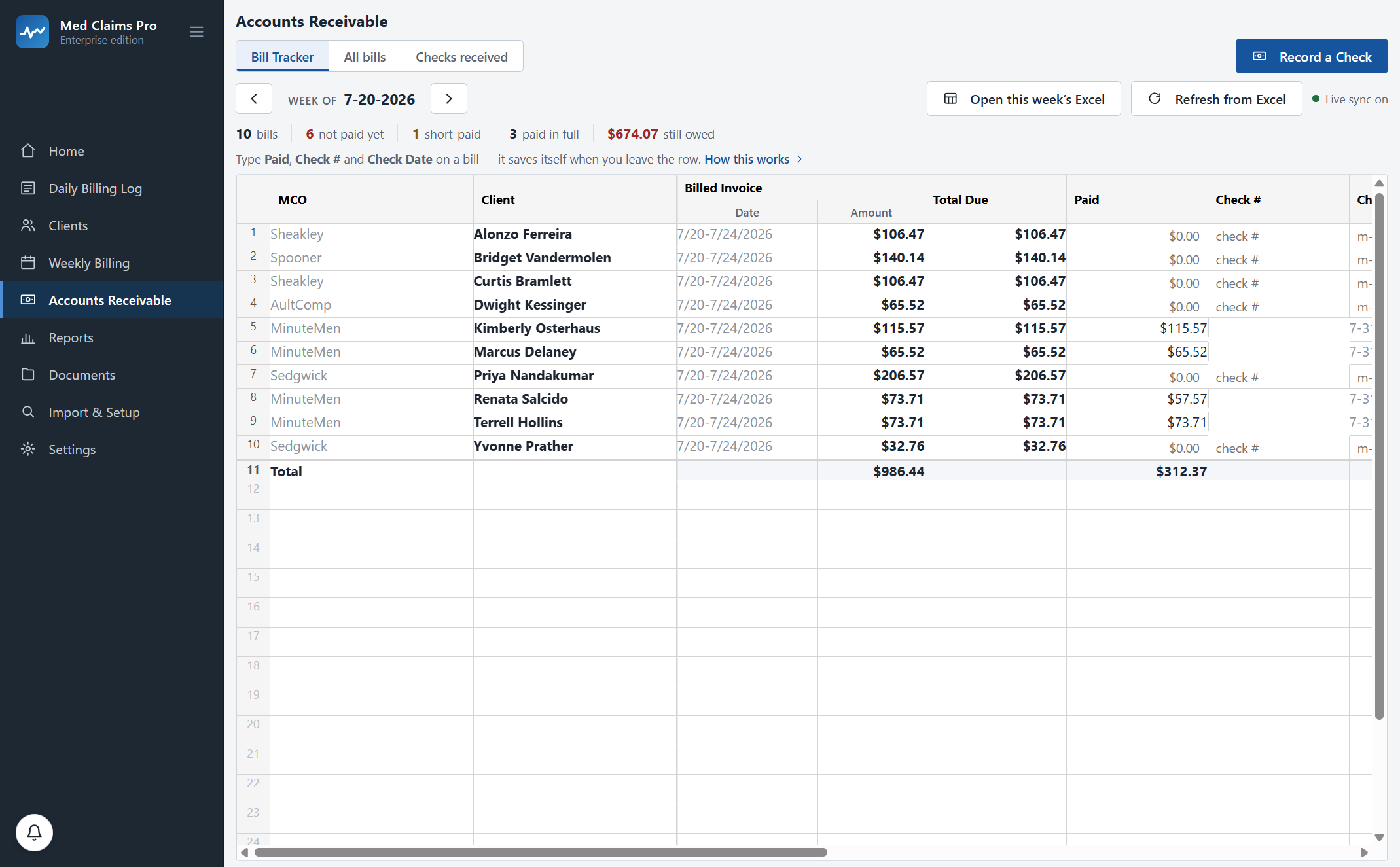
Twenty-eight bills. One check paid sixteen at once. Still owed, to the cent.
This is the Bill Tracker inside Med Claims Pro for one billing week. Names are legal placeholders; real Ohio MCOs, real code rates, real arithmetic.
Sixteen claimants, one check, one entry. The $16.14 did not need finding — it announced itself. What happens to a short-pay next →
From “Mark billed” to the last dollar accounted for.
A receivable per form, not per client
The CMS-1500 holds six service lines. A busy week runs past that, so line seven starts a B form and line thirteen a C form — and each form becomes its own tracked bill, because that is the unit the payer actually pays against. Two forms, two rows, exactly like your Bill Tracker.
One check, many claimants
Record the check once against the payer, then tick everything it covers. Sixteen claimants reconcile in a single screen, and every allocation stays auditable afterwards — which bill, which line, which check number, which date.
The gap flags itself
Paid less than billed and the bill flips to Short paid with the missing amount to the cent, the original form still attached, and a place in the follow-up queue. No quarterly reconciliation project, no 11 p.m. cross-referencing.
Status, not a checkbox
Open, waiting, partially paid, short paid, overdue, resubmitted, recovered, closed. A bill that has been rebilled reads differently from one nobody has touched, which is the difference between follow-up and hoping.
Aging that names names
0–30, 31–60, 61–90 and over 90, by payer and by claimant, computed on open balances as of today. You can answer “who is sitting on my money and since when” without opening a spreadsheet. Reports and aging →
Written into your folder
The week’s Bill Tracker workbook is generated into your Accounts Receivable folder, named the way you name them — week range and all — alongside every other week you have ever filed.
“My Bill Tracker already works.”
It does. It has worked for fifteen years. It has the column your accountant reads first, the withholding set-aside you keep by hand, the merged header, the banded Total row, and the print setup that makes it fit one page landscape. It is right.
What is wrong is that you have to key the same check into it sixteen times. So we did not replace the workbook — we reproduced it. When Med Claims Pro writes your Accounts Receivable file, it writes your file: the same columns in the same order, the same merged header, the same banded Total line, the same frozen panes, the same one-page-landscape print setup. Open it next to last week’s and you will not find the seam.
Every practice tracks a little differently. During onboarding we configure Med Claims Pro to your exact formats, your folders, your payers and your state’s codes — your Bill Tracker’s column order, your Total line, your payer list. That is included in every plan, not an implementation fee.
Open it in Excel afterwards and it is a spreadsheet, not an export. Type a check number straight into the cell if that is faster; hit Refresh from Excel and the app reads your edit back. Neither copy is the boss.
| MCO | Client | Billed | Total Due | Paid | Check # | Balance | |
|---|---|---|---|---|---|---|---|
| 5 | MinuteMen | Doe, John A. | 115.57 | 115.57 | 115.57 | 418702 | =E5-G5 |
| 6 | MinuteMen | Doe, John P. | 65.52 | 65.52 | 65.52 | 418702 | =E6-G6 |
| 8 | MinuteMen | Doe, Jane R. | 73.71 | 73.71 | 57.57 | 418702 | 16.14 |
| 10 | Sedgwick | Poe, James D. | 32.76 | 32.76 | — | — | 32.76 |
| 11 | Total | 2,987.33 | 1,863.43 | 1,123.90 |
What the alternative costs.
The usual answer to “I cannot keep up with the receivables” is to hire a workers’-comp billing service at a percentage of collections. Typical is 5–8%. It bills; it does not write your weekly tracking logs, and it does not sit in your folders — so you still do the documentation, and you pay a percentage on top of it.
Service percentages are the July 2026 market range (5–8% typical; some start near 3%). Your own quote is the number that matters — ask for it, then compare.
Fifteen minutes, your payers and your workbook on screen. Or call and ask; a person answers: (302) 202-3172.
Questions, answered.
Can one check pay bills for several different claimants?
Yes — that is the design, not a workaround. One payer check allocates across any number of bills and claimants in one screen. The screenshot on this page shows a single MinuteMen check, #418702, paying sixteen claimants, three of them short. Every allocation stays auditable afterwards: which bill, which check number, which date.
What if the payer overpays, or pays a bill twice?
Overpaying a bill is blocked at entry, with the billed amount and the amount you are applying shown side by side. If part of a check is still unallocated when you finish, that remainder is shown rather than silently absorbed — you decide where it goes.
Does it handle partial payments and second checks on the same bill?
Yes. A short-paid bill keeps its original form and its balance, and a later check can be recorded against the same bill — the workbook carries the second check number and date the way your own tracker does. Resubmission is a status, so a bill you have rebilled never looks the same as one nobody has touched.
We keep receivables in a spreadsheet. Do we have to give that up?
No. The workbook the software writes is your Bill Tracker — same columns in the same order, same merged header, same banded Total line, same frozen panes, same one-page print setup. You can also type into the workbook directly and have the app read your edits back.
Where does the receivables data live?
On your computer. Claims, bills, payments and the generated workbooks sit in a local database and in your own Documents folders; our server holds your account and your license and nothing else. How the architecture works →
What does it cost?
Accounts receivable, check allocation and short-pay detection are in Professional at $299/mo ($239 billed annually). Forms at $49/mo ($468 a year) covers clients, the daily billing log and the claim forms, without the receivables block. Free trial, no card; Sixty-day money-back guarantee; no contracts. Full pricing →
See your own week run itself.
We load your state’s codes before the call, so you are looking at a caseload like yours inside the first two minutes — not a slide deck.