Billing software for
vocational rehab professionals.
VRC · VRCM · QRC · rehabilitation supplier · rehabilitation practitioner · vocational counselor. Whatever your state calls you — if you bill a workers’-comp payer for your time, this was built around your exact week.
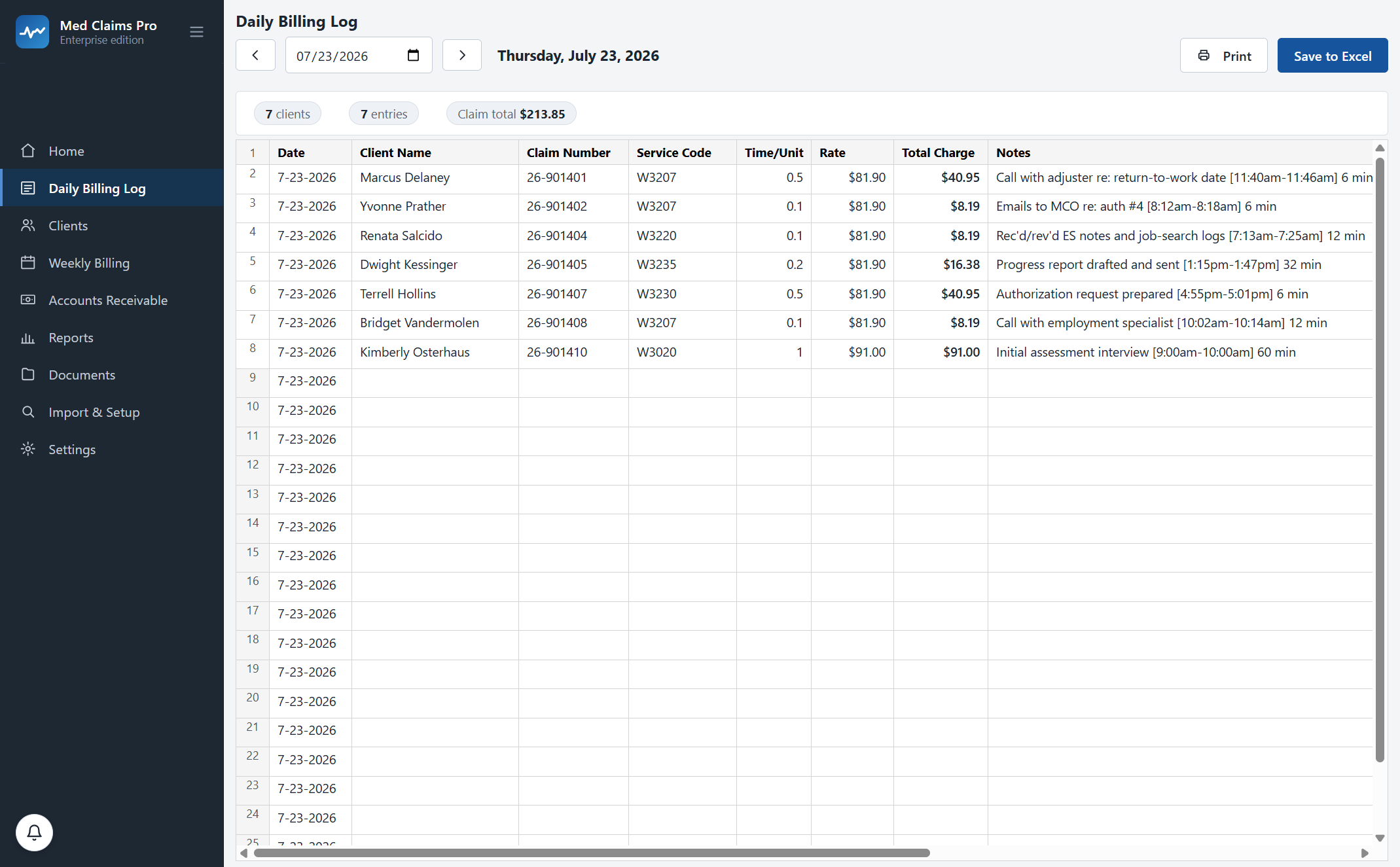
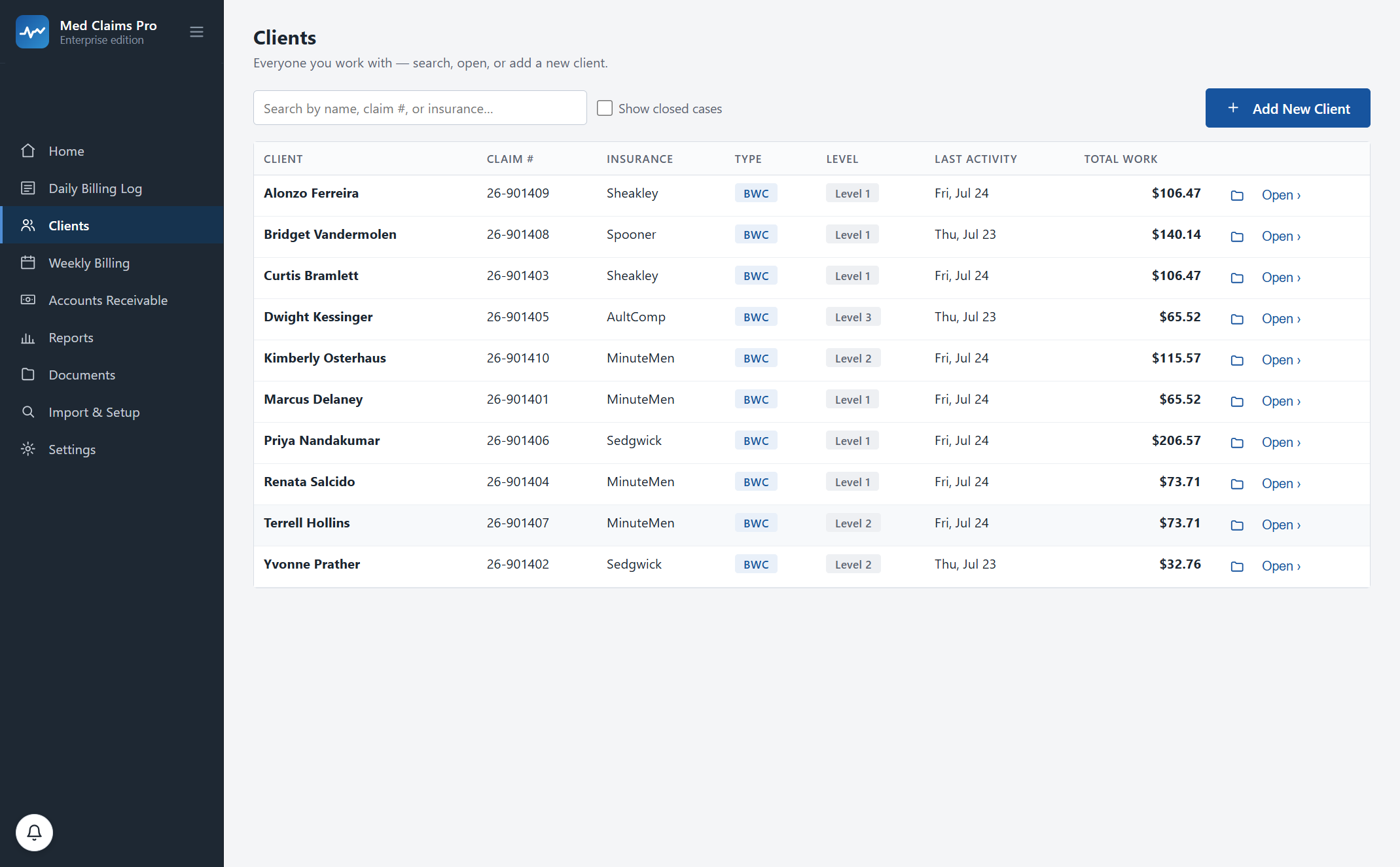
Your whole caseload, on one screen.
5:58 a.m. Six minutes on the employment specialist’s notes.
Tonight you’ll type it again.
You are not disorganized and you are not slow. You do a day’s counseling work, and then you do a second day of copying it into files that already know the answer. Here is that day. On the right is what the software has already done by the time you get to it.
- 5:58 a.m. Coffee, inbox, six minutes reviewing the ES notes and job-search logs. That’s W3220, 0.1 units, and you know it without looking. You type client, code, minutes, note — once. The rate, the claim number, the payer, the level suffix and the week fill themselves.
- 9:40 Call with the adjuster about authorization #6. Four minutes. Another row, coded and timed, against that claim number — so the four minutes are billable instead of forgotten, and the running total is on screen, not in October.
- 1:15 p.m. Progress report #8. Thirty-two minutes, plus the email sending it. Two entries. The note keeps your bracket style — [1:15pm–1:47pm] 32 min — and the same sentence lands in the weekly tracking log without being retyped.
- 4:55 Authorization request prepared and sent. One more. Your daily Excel log has been writing itself all day, in your template, in your folder, laid out the way your daily log is. It is already saved.
- 9:00 p.m. The second shift: the daily log, the tracking logs, the claim forms, the spreadsheet. This is the shift Med Claims Pro deletes. There is nothing left to type. The week is already in four documents because you entered it once, at 5:58 a.m.
One activity. Four files. Nobody ever built software for this job.
So the job got done in Excel, Word and a PDF form-filler, and the retyping became the profession. Six minutes of reviewing notes turns into four separate acts of data entry, three of which are transcription.
W3220 0.1 $81.90 $8.19
Rec’d/rev’d ES notes [5:58am–6:04am] 6 min
Four copies of the same six minutes. Once is enough.
Every task you name, and the thing that replaces it.
No feature here without a task you already do. No task without a feature.
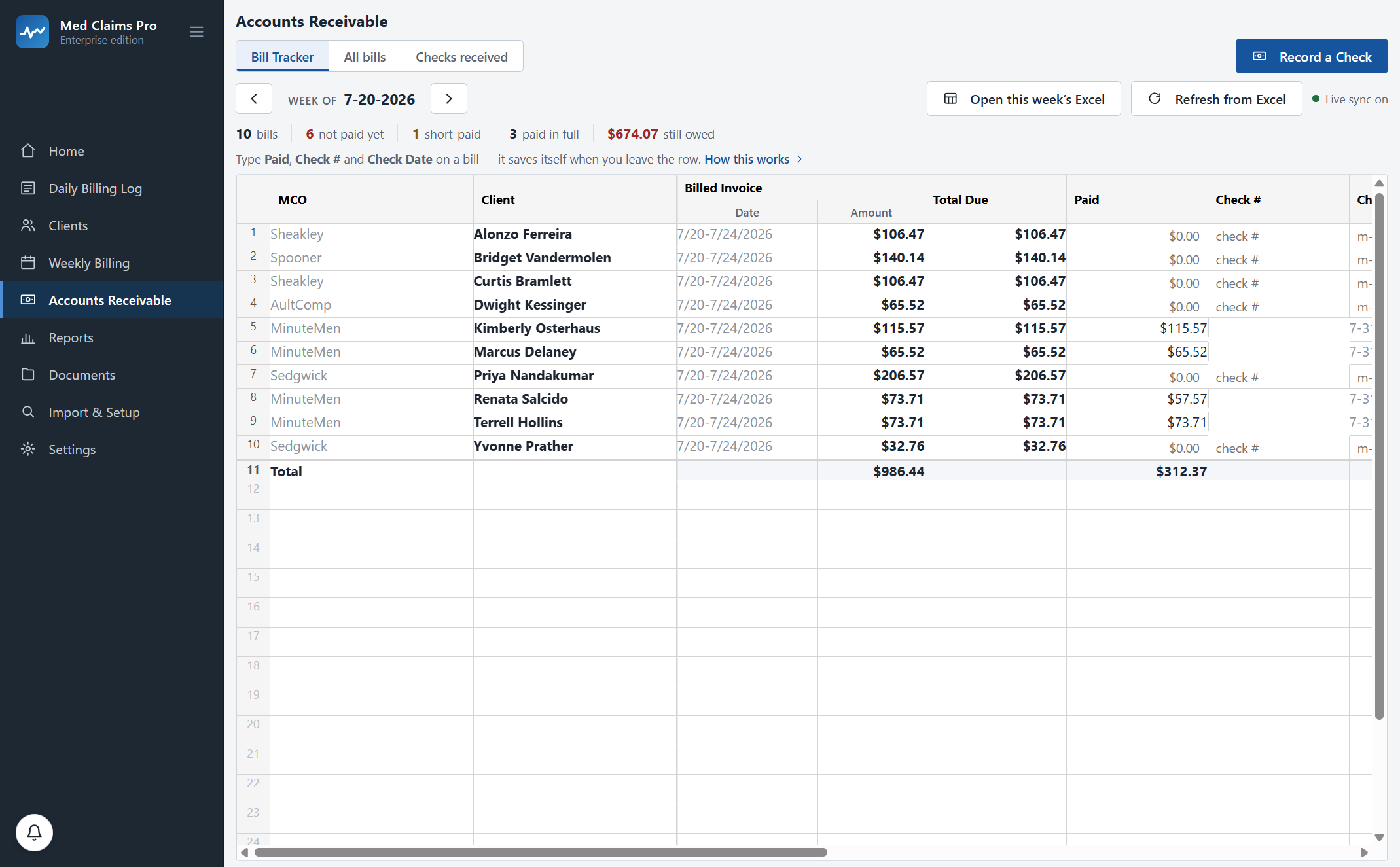
The check came. It covered sixteen claimants. Three of them short.
Jane R. Doe’s $73.71 bill came back at $57.57 — the gap on one line, on a check that covered sixteen people. You would catch it eventually — around 11 p.m., cross-referencing the EOB against your Bill Tracker, one line at a time. Med Claims Pro catches it the moment you record the check.
“My state does it differently.”
It does. That is the design. Ohio bills MCOs in W-codes by fax. Washington bills L&I in MARFS Chapter 25 units against referral caps. Minnesota QRCs invoice carriers by the hour and file R-forms. Georgia suppliers time-bill under Board Rule 200.2. The codes change, the forms change, the payers change. Your week does not.
“My formats are unique.”
Yes. Everyone’s are. Your tracking log has your headings. Your folders are named the way you have named them for eleven years. Your Bill Tracker has a column nobody else would understand.
During onboarding we configure Med Claims Pro to your exact templates, folders, payers and your state’s codes — so the software fits you on day one. That is included in every plan, and it is the first week’s work, not a change order.
Bring one real week to the demo and watch it import.
What “configured to you” means, concretely
- Your Word template
- Your tracking log, heading for heading — not our version of it.
- Your Excel workbook
- Your daily log and Bill Tracker, column for column.
- Your folders
- Documents land where your files already live, named your way.
- Your payers
- Each MCO, carrier or TPA with its own form template and fax number.
- Your state
- Codes, rates, forms and the filing clock for the state you work in.
“I only have fifteen cases.” “I already have a biller.”
Fifteen cases is still four files a week
The retyping does not scale down. Fifteen clients still means a daily log, fifteen tracking logs, the claim forms and the receivables sheet — it just means you do it in two evenings instead of four. Forms is $49 a month — or $468 for the year (20% off) — and covers clients, the daily billing log and the claim forms. If the receivables half is not your pain yet, that is the tier.
Your biller does not write your tracking logs
A billing service bills. It does not write the weekly narrative log, it does not track your case levels, and it does not sit in your folders. You still do the documentation — and you pay a percentage on top of it.
Rates for illustration. A 5–8% service on a $13,600 month runs $680–$1,088.
Built inside a working voc-rehab practice, not a whiteboard.
I used to lose my whole morning retyping the same numbers into a log, a Word report and the claim form — then again into a spreadsheet. Now I type it once and everything is done.
Her week, the one the software was measured against
- Caseload
- Roughly 30 injured workers billed in a single week.
- Activities
- 30–40 a day in 0.1-unit increments — now entered exactly once.
- Paperwork
- Four to eight hours of daily retyping, down to minutes.
- Payers
- Three MCOs, reconciled from one check screen.
Your client data never touches our servers.
It lives on your computer
Every claim, note, activity and document sits in a local database on your own machine, backed up automatically on every launch. Our server holds your license and nothing else.
In your folders, in your formats
Generated documents are written into the client folders you already use, with the file names you already use. Openable in Word and Excel with or without us.
Never held hostage
Cancel and the software goes read-only. You keep viewing and exporting everything, in your formats, indefinitely. No deletion, no export fee, no contract to get out of.
Fifteen minutes, your state’s codes on screen — we load them before the call, and you can bring one real week and watch it import. Or call and ask; a person answers: (302) 202-3172.
Questions, answered.
I’m not technical. How hard is setup?
If you use Excel and Outlook you are overqualified. The grid works the way your spreadsheet works — typing, right-click, resizing, row numbers. Setup is ours, not yours: during onboarding we configure your templates, folders, payers and state codes, and most practices are working in their first week. There is also a phone number with a person on it: (302) 202-3172.
Is my client data on your servers?
No. Claims, notes, activities and documents live in a local database on your computer and in your own folders. Our server stores your account and your license — that is the complete list. How the architecture works.
What happens if I cancel?
The software goes read-only. You can view and export every client, claim, document and receivable, in your formats, for as long as you like. No deletion, no hostage data, no export fee. There are no contracts — you cancel when you want to.
Does it handle a week with more than six service lines?
Yes. The CMS-1500 holds six lines; line seven starts a B form automatically, line thirteen a C form. Each form gets its own receivable row, because that is how the payer’s checks come back.
How do fee-schedule changes work — Ohio’s October update, for example?
They ship as a data update and you do nothing. New work bills the new rate. Activities you already filed keep the rate they were filed under, so an audit of last year still reconciles.
Do you do e-billing or clearinghouse submission?
Not yet. Today it is fax with a filed confirmation, a portal upload you do yourself, and paper — which is what most states still run on. Direct e-billing for the mandate states is on the roadmap; ask us and we will tell you the moment it ships. We will not tell you it exists before it does.
What does it cost, and is there a guarantee?
Forms $49/mo, or $468 for the year (20% off), covers clients, the daily billing log and the CMS-1500 filling and printing. Professional $299/mo, or $239/mo billed annually, adds the weekly Word tracking logs, error checking, receivables, short-pay recovery and faxing. A firm plan for more than one specialist is priced on a call — and note each person runs their own copy with their own records. Free trial, no card. Sixty-day money-back guarantee: if it has not earned its place in your week, we refund every cent and export your data in your formats. Full pricing.
See your own week run itself.
We load your state’s codes before the call, so you are looking at a caseload like yours inside the first two minutes — not a slide deck.