Thirty activities a day.
Each one typed once.
W3220 for the employment specialist’s notes you reviewed at 7:13 this morning. Tenth-of-an-hour units, the way your fee schedule counts them. You type the client, the code, the minutes and the note — the claim number, the payer, the rate, the level suffix and the billing week fill themselves, and your daily Excel log saves itself in your own template as you go.
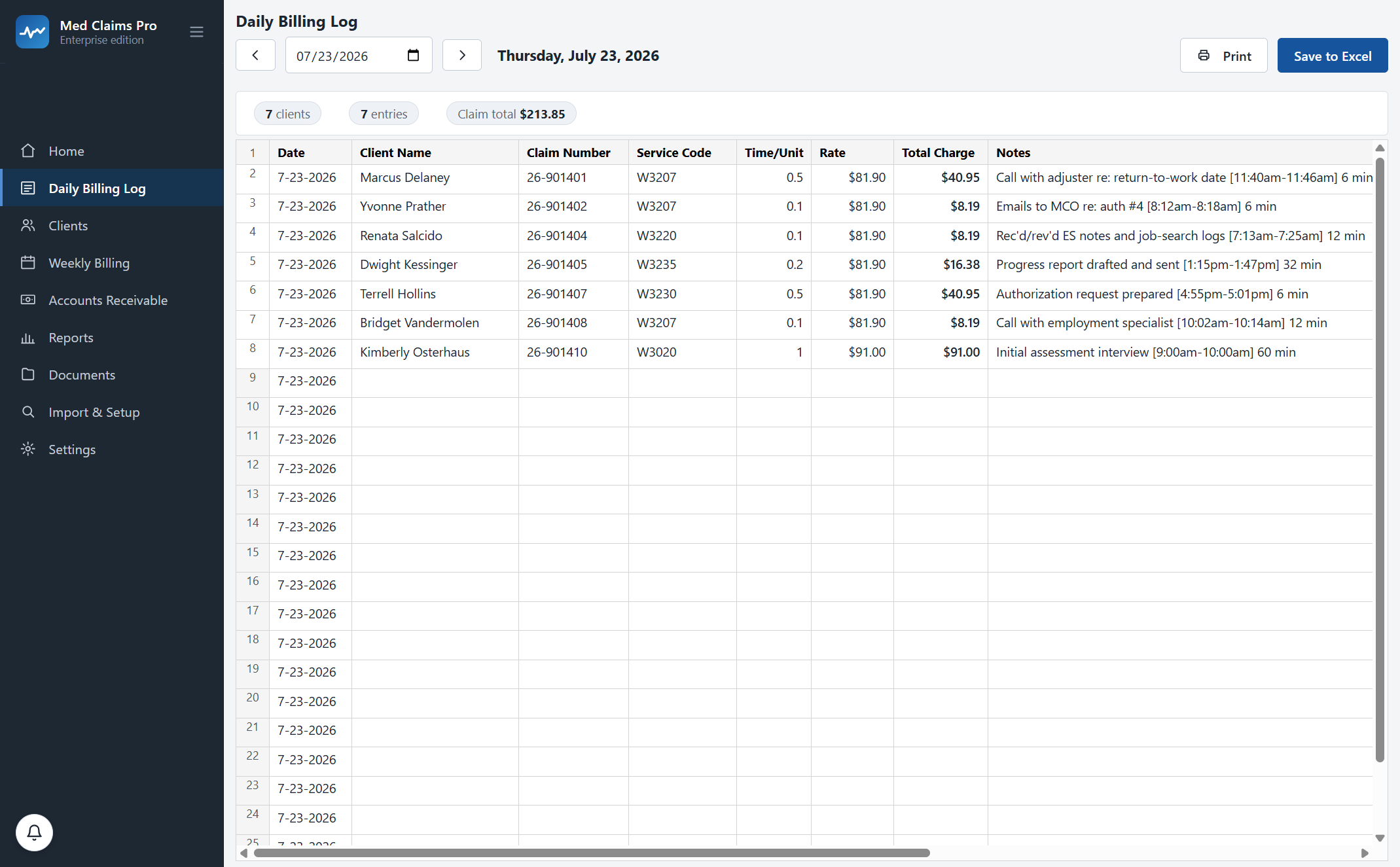
Thirty-one entries. Twenty-two claimants. $1,211.18.
None of it typed twice.
This is one ordinary Thursday. On the left is when the work happened. On the right is what the grid had already done by the time you moved on to the next call.
- 7:13 a.m. Rec’d/rev’d ES notes and job-search logs. You type the client’s first three letters. The claim number 26-901404 and the MCO arrive with the name. You type W3220; the rate $81.90 arrives with the code. You type the units; the charge is done before you have looked away.
- 8:12 Emails to the MCO about authorization #4. Second row, six seconds. The note keeps your bracket style — [8:12am–8:18am] 6 min — and the app does the subtraction so the bracket and the minutes can never drift apart.
- 9:00 Initial assessment interview, an hour. W3020 bills at $91.00, not $81.90, because it is an assessment code. You do not have to remember which codes carry which rate, or which ones are leveled.
- 1:15 p.m. Progress report drafted and sent. One entry for the report, one for the email that sent it. The same sentence lands in Friday’s Word tracking log without being retyped.
- 4:55 Authorization request prepared. The day reads $1,211.18 across twenty-two claimants at the top of the screen, and your daily .xlsx on disk already says the same thing. There is no “now enter it” step.
The grid, with real Ohio codes in it.
Ohio W-code rates shown are the vocational rehabilitation fee schedule current as of July 2026 — verify with the Ohio Bureau of Workers’ Compensation.
Four fields in. Nine fields out.
Everything on the right already exists somewhere in your files. Typing it again is not data entry, it is transcription — and transcription is where the errors come from.
Your workbook is right. It has been right for fifteen years.
What is wrong is that Monday’s six minutes has to be typed into it four separate times. So the workbook stays. The app writes it.
The daily .xlsx is a real Excel file in your real folder — not an export, not a copy, not “our version” of it. Open it in Excel while the app is running. Change a row by hand. The app reads your change back in: the file is the authority, so the screen and the workbook cannot disagree.
That is also the exit door. If you ever stop paying us, the last fifteen years and this morning are both sitting in the same folder, in the same format, opening in the same Excel.
Every practice logs a little differently. During onboarding we configure Med Claims Pro to your exact formats, your folders, your payers and your state’s codes — your daily .xlsx template, your code list, your running totals. That is included in every plan, not an implementation fee.
The round-trip, precisely
- Your template
- Your column order, your headers, your formulas — not reformatted.
- Written live
- Saved as you type, not on a “sync” button you might forget.
- Read back
- Hand edits made in Excel come back into the app.
- Your folder
- Where your daily logs already live, named the way they are already named.
- Nothing renamed
- Import is read-only against your existing files unless you explicitly ask for a change.
“I am faster in my spreadsheet than in anybody’s software.”
Probably true today, which is why the grid was built to behave like a spreadsheet rather than like a web form. If it fights your hands, it has failed.
It types like Excel
Row numbers down the side. Right-click for the row menu. Drag a column edge to resize it and it stays resized. Tab and arrow keys move the way you expect, and every cell in the app accepts typing — no cell that looks editable and is not.
It never loses a keystroke
Autosave on every change, with crash-proof drafts. If Windows restarts itself for an update in the middle of your Tuesday, the Tuesday is still there.
It catches what you cannot
A code that does not exist for that case type, a client with no claim number, a rate that changed in October — caught while you are entering, not after the fax went out.
Undo is real
Deleted entries are recoverable rather than erased. A billed week locks so the amounts cannot drift away from the forms you already filed.
Any day, any week
Walk back to a Thursday in March, add the entry you forgot, and every document and receivable that depends on it updates to match.
Nothing to file afterwards
Save to Excel and Print are there when you want a paper copy, but the workbook has already been written to your folder by the time you reach for them.
This is the only screen the week is typed into.
Everything downstream reads these rows. Nothing downstream asks you to enter them again.
The weekly tracking log
Your notes, grouped by date, in your Word template, one click per client per week.
The CMS-1500
Units converted the way the form wants them, the right payer header, automatic overflow onto B and C forms at line seven.
Worked, billed, paid, owed
Work performed is counted by date of service from these rows, and kept strictly apart from what you billed and what has been paid.
Bring one real week to the demo and watch it import — or call and ask; a person answers: (302) 202-3172.
Questions, answered.
Does it replace my daily Excel log, or write it?
It writes it. The daily .xlsx stays exactly where it is, in your template, and the app keeps it current as you type. You can open it in Excel any time, and hand edits you make there come back into the app.
Can I still enter work for a day that has already gone by?
Yes. Walk the date arrows back to any day, add or correct the entry, and the week’s documents, totals and receivables follow it. If that week was already billed, the app tells you rather than silently changing an amount you have already filed.
How do the 0.1 units work?
You enter units the way your fee schedule counts them — tenths of an hour for time-based codes, counts for mileage and outcome codes. The charge is the code’s current rate times the units, calculated live, and the conversion the claim form wants (0.1 becomes “1”) happens later, on the form, not in your head. How the form gets filled.
What happens when the fee schedule changes?
Rate updates ship as a data update and you do nothing. New work bills the new rate; work you already entered keeps the rate it was filed under, so an audit of last year still reconciles.
Will it touch my old files?
Only to read them. Import scans the daily logs, Bill Trackers and client folders you already have and adopts what it finds. Nothing is renamed, moved or overwritten unless you explicitly ask for it.
What if the app and my workbook end up saying different things?
They cannot sit there disagreeing. The app compares the daily entries against the workbook, the filed Word logs, the generated claim forms and the receivable for every client-week, tells you when they all agree, and itemizes anything it corrected when they do not.
See your own week run itself.
We load your state’s codes before the call, so you are looking at a caseload like yours inside the first two minutes — not a slide deck.