Your workbook is right.
It has been right for fifteen years.
The daily log, the Client Tracking Log, the Bill Tracker with the merged header and the Total Due column — you built all of it, and it is more accurate than most software. What is wrong is not the workbook. It is that Monday’s six minutes has to be typed into four separate files before anyone pays you for it.
The spreadsheet is not the problem. It is the reason you are still in business.
Nobody ever built software for workers’-comp vocational rehabilitation. A few thousand professionals across fifty different statutes, each with its own codes and forms and payers — a terrible market to build for. So it never got built, and every counselor in the country solved it the same way: Excel, Word, and a form-filler.
What you built is better than what most vendors would have shipped. It knows your MCOs. It knows that a Level 2 plan-implementation code bills at $84.40 and a Level 1 at $81.90. It knows which client is a JR case and which is SI. It knows the week runs Monday to Friday and the bill goes out on the Friday date. None of that is written down anywhere except in your workbook and in your head.
You were not doing it the hard way. You were doing it the only way.
What the workbook is genuinely better at
- It changes instantly
- New payer, odd rate, a column you want on the left — thirty seconds. No vendor, no ticket, no release.
- It is entirely yours
- No subscription, no license, no company that can go away and take the file with it.
- It works offline
- On a plane, at a hearing, on a laptop with no signal.
- You know where everything is
- Fifteen years of muscle memory. That is real, and any replacement has to earn it back.
A workbook stores what you typed. It does not store the bill.
That is not a criticism of Excel. It is what a spreadsheet is: a grid of values you entered. Everything below follows from it — the short-pay you cannot catch, the retyping you cannot stop, and the sixty-day-old bill you cannot see. Three symptoms, one cause.
W3220 0.2 $81.90 $16.38
Rec’d/rev’d ES notes [7:13am–7:25am] 12 min
Four copies of the same twelve minutes. Every one of them a place a digit can change. That is the villain on this page — not you, and not the file.
It cannot catch a short-pay. Not because you are careless — because it has nothing to compare.
The MinuteMen check arrives. One check, sixteen claimants, one stub. You billed $73.71 for Doe, Jane R.’s week; the line pays $57.57. Sixteen dollars and fourteen cents, gone quietly.
To catch that in a workbook you need three things sitting next to each other: what that specific form billed, what was applied to that specific form, and a comparison that runs every time. Your Bill Tracker has a billed column and a paid column, so in principle it can. In practice the check covers four people across two weeks, the amounts get entered as a total, and the per-form comparison is the thing that gets skipped at 11 p.m. because the totals nearly match.
And short-pays are not one big theft. They are forty small ones. Each individual gap is too small to interrupt your evening for, and the sum of them is not. Which is exactly why they survive.
Why bills come back short
- Unit math
- You billed 0.1 units; bill review priced it as one hour, or as nothing.
- A stale fee schedule
- Ohio’s voc-rehab rates change every October. A payer on last year’s table underpays every line by the difference.
- Overflow forms
- Your week ran past six lines onto a B form. The payer paid the A form and treated the B as a duplicate.
- A dropped line
- One line disappears in bill review and the remainder still looks roughly right on the check.
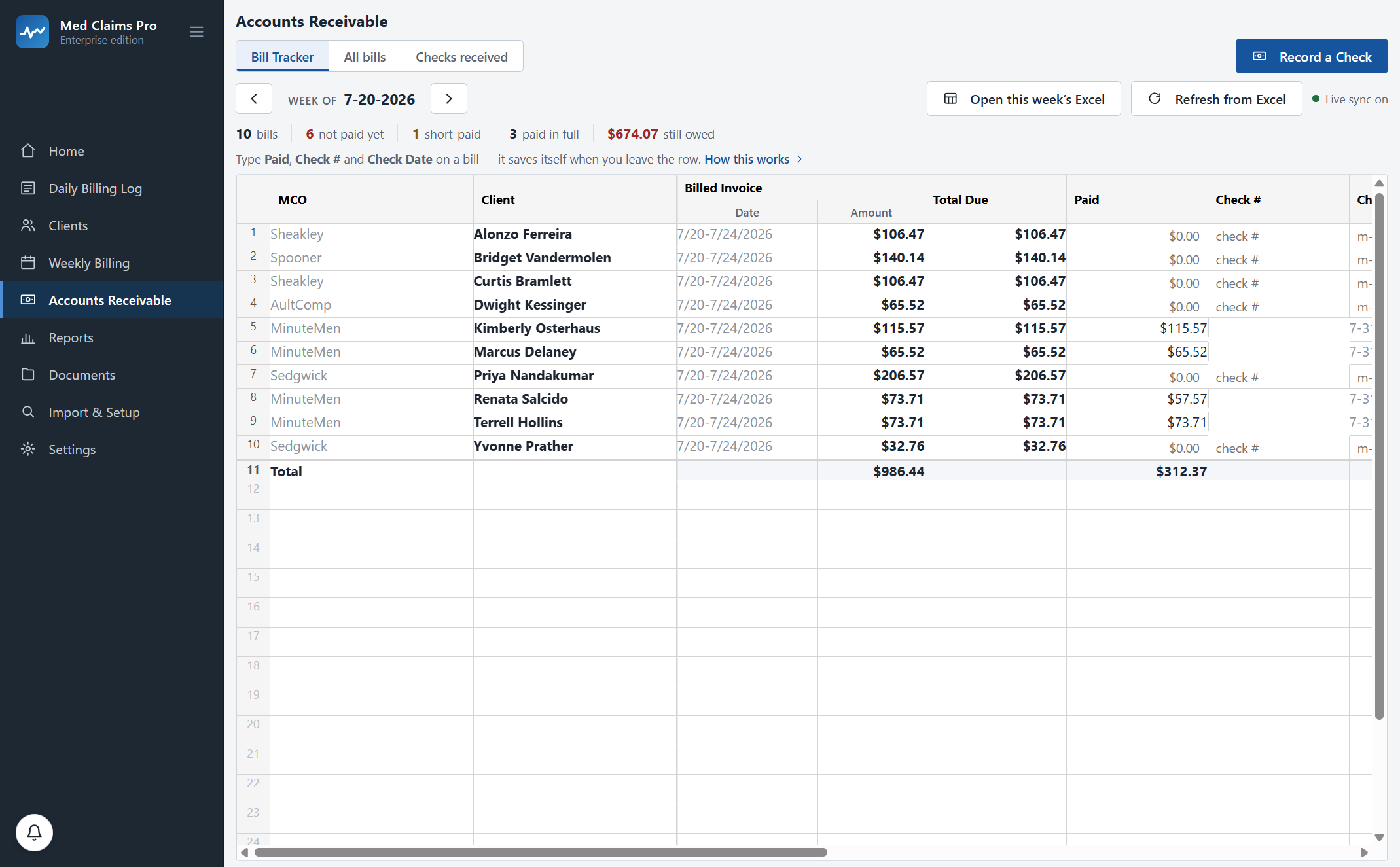
It cannot stop the fourth retyping. A cell cannot write a paragraph in Word.
This is the plainest of the three. Excel holds numbers extremely well. It does not open your Word template, write the week’s narrative in your headings, and save it as Doe, Jane R. 7-20-2026.docx in the client folder. It does not lay a CMS-1500 out six lines to a page, notice that your week ran to nine lines, and start a B form at line seven with the same claim number and the right MCO header.
Yes, a macro can do some of it. Then you own the macro. It breaks when Word updates, when a client name has a comma in it, when the MCO changes mid-case — and there is nobody to call. The retyping did not go away; it turned into maintenance, and maintenance is not what you trained for.
What changes here: the activity is an object, not four copies of a number. It knows its client, its claim number, its code, its units, its rate, its payer, its billing week and its note. Every document downstream is a rendering of that object.
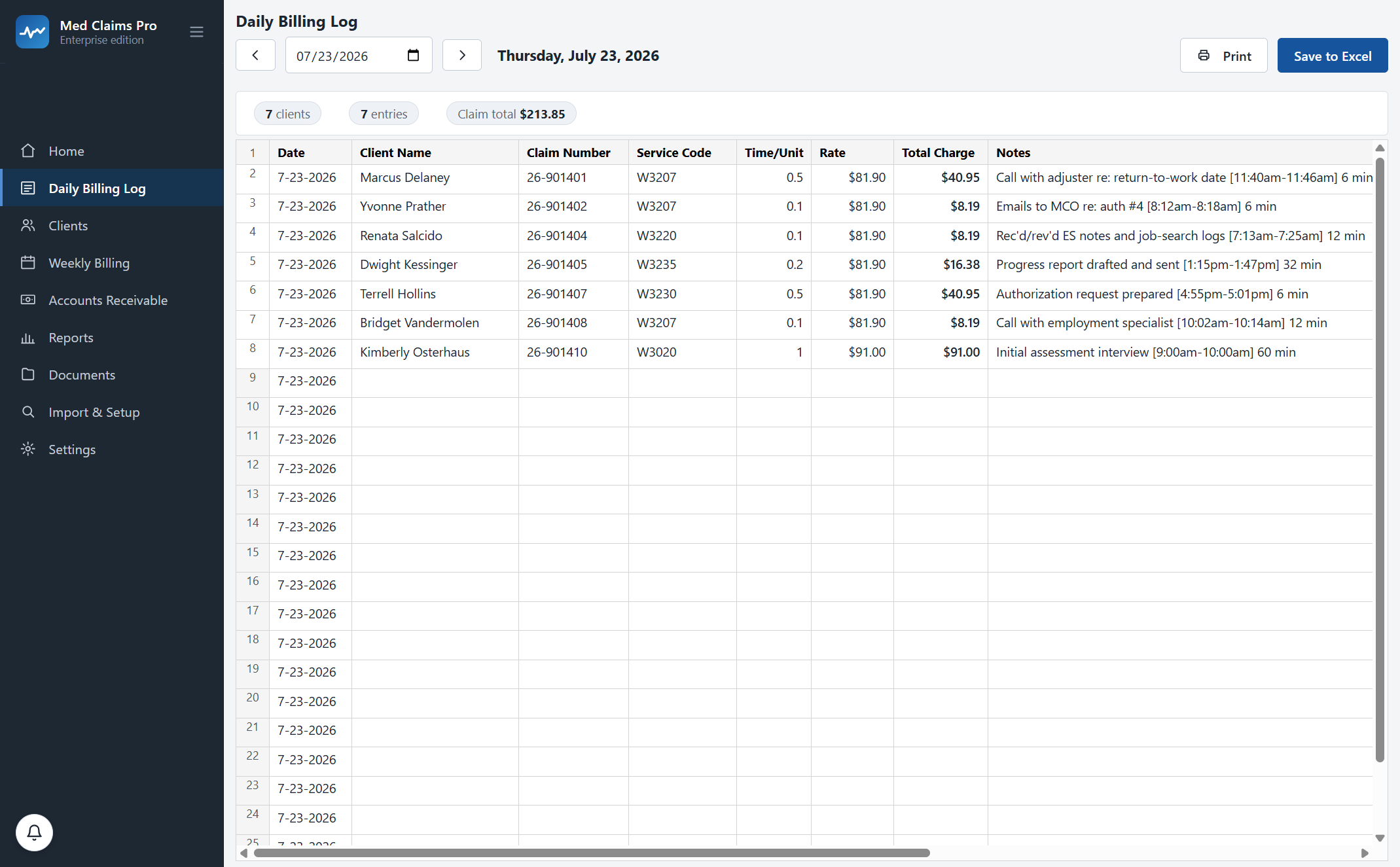
It cannot tell you which bill is sixty days old.
Aging looks like the easiest of the three — =TODAY()-B4 and you have days
outstanding. And you can build that, and some counselors have.
Then the check that covers sixteen people lands on the 3rd. Thirteen of those bills are now paid in full, three came back short — one of them by $16.14 — and the balance column that aging depends on is only right if all sixteen allocations were entered correctly, per form, that evening. The aging is not hard. Keeping the balance true underneath it is hard, and that is limit one again.
So the honest version of what a workbook gives you is: a list of what you billed, and a strong memory. What it does not give you is a screen that says $1,123.90 is owed and shows you which payer has been sitting on the oldest of it for sixty-one days — without you first doing an evening of reconciliation to make that sentence true.
In Ohio the filing window is one year from the date of service. That is long enough to lose a bill in, which is precisely how bills get lost.
Figures from the screenshot above — one real week of an invented Ohio caseload, real MCOs, real W-code rates. Ohio timely filing: one year, per Ohio BWC. Current as of July 2026 — verify with Ohio BWC.
You do not give up Excel. Excel stops being the place you type.
This is the part most people get wrong about the pitch, so it is worth being blunt: your daily billing workbook still exists, still opens in Excel, still has your column order and your merged header and your Total Due column. It is written for you instead of by you.
Your files, your formats
The daily log is your workbook. The tracking log is your Word template, with your headings and your file naming. The Bill Tracker keeps its layout — the merged header, the column order, the Total Due column, the banded totals row — reproduced from your own file, not a lookalike we designed.
Your folders, your naming
Documents file themselves where you already keep them — the client folder named the way you name it, the Billing Info and CMS 1500 subfolders, the Closures folder for closed cases. Nothing gets moved into a system you then have to browse.
Your history, imported as-is
Onboarding reads the workbooks and client folders you already have, without altering them, and brings your clients, claim numbers, payers and prior bills across. Fifteen years does not get retyped either.
“Is my client data going to sit on your servers?”
No. Every claim, note and document lives in a database on your own computer, backed up on every launch and exportable any day you like. Our server holds your license and nothing else. If your internet is down, the software still runs. This is the one thing we will not compromise on, because you have had twenty-five years of HIPAA training and you are right to ask first.
“My formats are unique — everyone does their Excel a little differently.”
They do, and that is exactly what onboarding is for. Your templates, your folder tree, your naming, your payers, your state’s codes — configured in your first week, included in every plan. The software fits your paperwork; you do not reformat your practice to fit it.
“I’m not technical.”
If you run Excel and Outlook you are overqualified. The main screen is a grid you type in with the arrow keys, and it was designed alongside a working counselor who told us every time it stopped behaving like her spreadsheet. And there is a phone number with a person on it: (302) 202-3172.
“What if I stop paying, or you go away?”
The software goes read-only. Not dark — read-only. You keep opening it, viewing everything and exporting in your own formats, forever. And because the documents were written into your folders as Word, Excel and PDF files all along, they are already yours whether the software runs or not.
“My workbook has fifteen years of history in it.”
Keep it. Nothing overwrites your existing files during import — the reader is read-only by design. Historical activities also keep their historical rates, so an October fee-schedule change never rewrites what you billed in September. That is how an audit expects it to behave.
Three of the four typings, and the evening they live in.
Our first customer — an Ohio voc-rehab practice, about thirty injured workers billed weekly, thirty to forty activities a day — put her own before-number at four to eight hours of paperwork a day. That is her figure, from her practice. We are not going to pretend it is a study, and we are not going to pretend yours will match it.
So here is a deliberately conservative version instead: if the retyping is the second shift on Sunday evening and it takes five hours a week, that is roughly 21 hours a month. Put your own hourly rate against that; you know it and we do not.
The guarantee is the bounded version of this promise. Sixty days. If it has not earned its place in your week, we refund it and export your data — your judgement, no threshold to prove. That is our obligation with a date on it, not an adjective.
Forms $49/mo ($468 a year) covers clients, the daily billing log and the claim forms. Professional $299 ($239/mo annual) adds the weekly Word tracking logs, error checking, receivables, one-check allocation and short-pay flagging. Full pricing →
Bring one real week and one real remittance to the demo and watch your own paperwork run through it. Fifteen minutes, your state’s codes already on screen. Or start the trial — no card, your data stays on your computer.
Still weighing the other options? A 5–8% billing service · daisyBill · CMS-1500 form-fillers · All four side by side
Questions, answered.
Do I have to stop using Excel?
No. Your daily billing workbook still exists as an .xlsx file, laid out the way your daily log is laid out, and it opens in Excel like it always did. The difference is that it is written for you as you work instead of typed by you at night. Same with Word: the tracking log is a real .docx in your template, saved in your client folder.
Will importing my spreadsheets change them?
No. The historical importer is read-only by design — it reads your existing workbooks and client folders and brings across clients, claim numbers, payers and prior bills without writing to a single one of your files. If it ever needs to rename a folder it asks you first.
My spreadsheet is set up differently from everyone else’s. Does that break it?
It is expected. Our founding customer’s first sentence to us was that everyone does their Excel a little differently. Onboarding configures your templates, folder tree, naming, payers and state codes in your first week, and it is included in every plan rather than sold as an implementation fee.
Can a spreadsheet really not catch a short-pay?
It can, if you maintain a per-form billed-versus-applied comparison for every bill, every week, and enter each payer check allocation per form on the night it arrives. That is not a software limitation you can argue with — it is simply a lot of evening work, and it is the first thing that gets skipped when the totals nearly match. The software does that comparison the moment you record the check.
What about the macros I already built?
Keep them if they earn their place. What we would say honestly is that a macro moves the work from retyping to maintenance — it breaks on a Word update, a comma in a client name, or an MCO that changes mid-case, and there is nobody to call. If yours has been stable for years, that is a genuine achievement and a real reason to wait.
Is my data on your servers?
No. Claims, notes and documents live in a local database on your computer, backed up on every launch and exportable any time. Our server stores your license and nothing else. Cancel and the software goes read-only — your records stay yours. How the local-first architecture works →
See your own week run itself.
We load your state’s codes before the call, so you are looking at a caseload like yours inside the first two minutes — not a slide deck.